 HomeLink Hub
Notifications and help
The in-app notifications screen and the built-in help center with its categories, articles and FAQs.
Where it lives
| Route | View file | Access |
|---|---|---|
/notifications | src/views/app/notifications/notification.tsx | signed-in, agent or landlord |
/help | src/views/app/help/help.tsx | signed-in, agent or landlord |
/help/category/:categorySlug | src/views/app/help/help-category.tsx | signed-in, agent or landlord |
/help/article/:articleSlug | src/views/app/help/help-article-detail.tsx | signed-in, agent or landlord |
Supporting code: src/lib/notifications.ts (storage helpers), the GlobalNotificationSubscriber in src/main.tsx (socket listener), src/services/chat/socket.service.ts, and src/content/help-content.ts (all help text).
Before you start
- Signed in as an agent or landlord.
- Notifications only arrive while the app is open in a browser tab that loaded with a valid session.
- The help center needs no network access beyond loading the app; its content ships with the app.
Flow
How notifications arrive
-
When the app loads with a token in
sessionStorage, it opens a Socket.IO connection to the API host (the token goes in the socket'sauthpayload) and emitsnotifications:subscribe. -
Each
notifications:newevent carries anid,type, optionaleventType,title,bodyandcreatedAt. -
The app turns it into a stored notification and puts it at the front of the list in
localStorageundernotifications. An event with anidalready in the list replaces the old copy.Field How it is set audienceappfor agents and landlords,legalfor lawyerscategoryproperty,messagesorpaymentswhen the type is one of those; everything else is filed undersecuritytimeA fixed label made on arrival, such as "Nov 25, 3:40 PM", or "Just now" when the event has no usable date readfalse -
The bell in the topbar updates its red unread badge straight away.
There is no request that loads notification history from the server. The list is whatever this browser has received.
Read notifications
- Click the bell in the topbar. Before navigating, the app marks every stored notification for this audience as read and clears the badge, then opens
/notifications. - The page is headed "Notifications" with "Real-time in-app notifications".
- Use the tabs to filter: All, Property, Messages, Payments, Security.
- Each card shows an icon for its type, the title, the body and the time label. New notifications that arrive while the page is open appear at the top.
Clicking a card marks that one notification as read in storage. Cards are not links: they do not open the related request, message or listing, and read and unread cards look the same.
The page can also be opened with "Notifications" in global search. That route does not mark anything as read.
Help center home
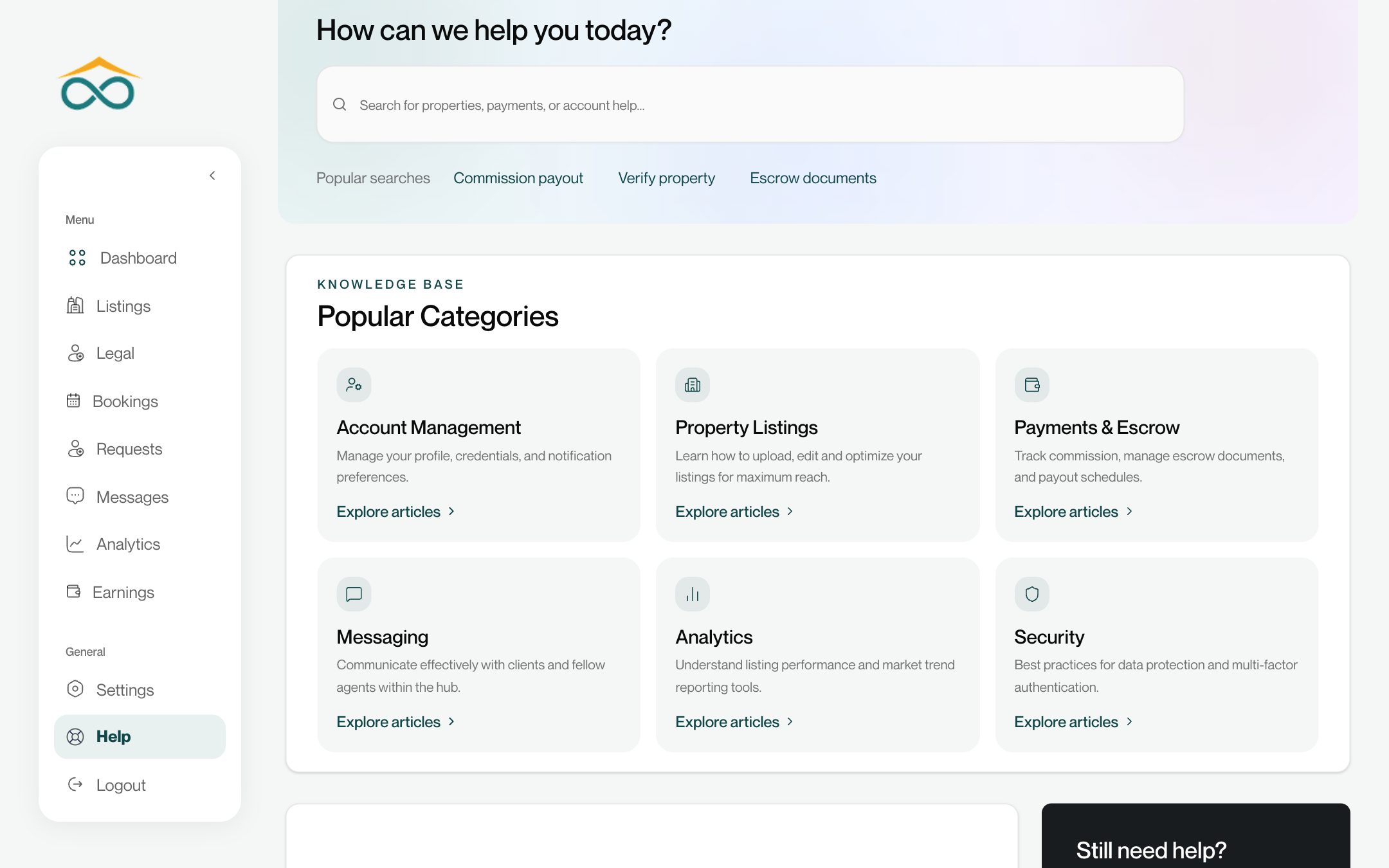
Open Help in the sidebar, Contact Support in the profile menu, or "Help center" in global search. The topbar is hidden on this one page.
-
Search. Type in "Search for properties, payments, or account help...". Results appear in a dropdown as you type: articles whose title or summary contains the text, then FAQs whose question contains it. Clicking a result opens its article. With nothing found it reads "No results for" and the query.
-
Popular searches. Three chips, each opening one article: "Commission payout", "Verify property" and "Escrow documents".
-
Popular Categories. Six cards. Clicking one opens its category page.
Category Route Account Management /help/category/account-managementProperty Listings /help/category/property-listingsPayments & Escrow /help/category/payments-escrowMessaging /help/category/messagingAnalytics /help/category/analyticsSecurity /help/category/security -
Promoted FAQs. Five questions in an accordion; one can be open at a time. Each answer has a Read full article link.
-
Still need help? Two buttons, Live Chat and Email Support. Both open a
mailto:link to the support address in the user's mail client. There is no in-app chat. -
Secondary Resources. "Compliance Guide" opens the Security category. "Video Tutorials", "API Documentation" and "Product Updates" are disabled and marked "Coming soon". Replay app tour restarts the walkthrough described in Navigation and layout.
Category page
/help/category/:categorySlug shows a breadcrumb (Help Center, then the category), the category title and description, and a card for each article in it with its title and summary. Each category currently holds two articles. Back to Help Center returns to /help.
Article page
/help/article/:articleSlug shows a breadcrumb (Help Center, category, article), the title and summary, the article body in headed sections, a "More in" list of the other articles in the same category, and Back to Help Center.
The twelve articles:
| Category | Article slug |
|---|---|
| Account Management | agent-onboarding-kyc, profile-notifications-settings |
| Property Listings | creating-a-listing, setting-inspection-fee |
| Payments & Escrow | how-escrow-works, tracking-your-earnings |
| Messaging | messaging-clients, notification-preferences |
| Analytics | dashboard-stats-explained, performance-chart |
| Security | two-factor-authentication, account-safety-best-practices |
Help articles, topics and FAQs are also indexed by the topbar's global search under the "Help" group.
States and edge cases
- No notifications. A bell icon with "No notifications yet". This is also what a filtered tab shows when it has no matches.
- Notifications are per browser. A different browser or device starts with an empty list, and clearing site data removes them.
- Shared browsers. Signing out removes the token, refresh token and user, but not the
notificationskey. The next agent or landlord to sign in on the same browser sees the previous user's stored notifications. - Missed while away. Events sent while no tab was connected are not fetched later.
- Socket reconnection. The socket retries up to 5 times, 2 seconds apart. After that, notifications stop until the page is reloaded.
- Subscription after sign-in. The listener is set up once when the page loads. Because signing in navigates without a reload, a freshly signed-in user does not receive live notifications until the next full page load.
- Unknown category slug. "Category not found" with Back to Help Center.
- Unknown article slug. "Article not found" and "This help article may have been moved or removed."
- FAQ search results without an article. Clicking does nothing; all five current FAQs have an article.
Help copy can run ahead of the app
src/content/help-content.ts. Where it disagrees with behaviour documented in this section, the behaviour wins. For example, the two-factor FAQ says future sign-ins will require a second step, but the sign-in screen in this app has no such step (see Settings).What happens next
- The client does not decide which events produce a notification. It only saves the channel preferences from Settings or onboarding and displays whatever the socket delivers.
- Reading or clearing notifications here is not reported back to the server.