 HomeLink Hub
Earnings and withdrawals
The wallet balance, earnings history, bank withdrawals and sending a single earning to the bank.
Where it lives
| Route | View file | Access |
|---|---|---|
/earnings | src/views/app/earnings/earnings.tsx | agent, landlord |
/earnings?action=withdraw | same page, opens the withdrawal dialog (src/views/app/earnings/components/withdraw-dialog.tsx) | agent, landlord |
/earnings (row click) | src/views/app/earnings/components/earning-detail-dialog.tsx | agent, landlord |
API calls are in src/services/earnings/earnings-api.ts (base path /api/v1/earnings).
Before you start
- Signed in as an agent or landlord.
- To withdraw: an available balance above zero. A saved payout account is optional, because a bank account can be typed in during the withdrawal.
- To dispatch a single earning: a payout account saved under Settings, Payments & Billing, with a bank chosen from the list (the transfer is routed by bank code).
- The saved account is verified against the bank when it is entered in onboarding or Settings. Account numbers are Nigerian NUBAN numbers of exactly 10 digits.
Flow
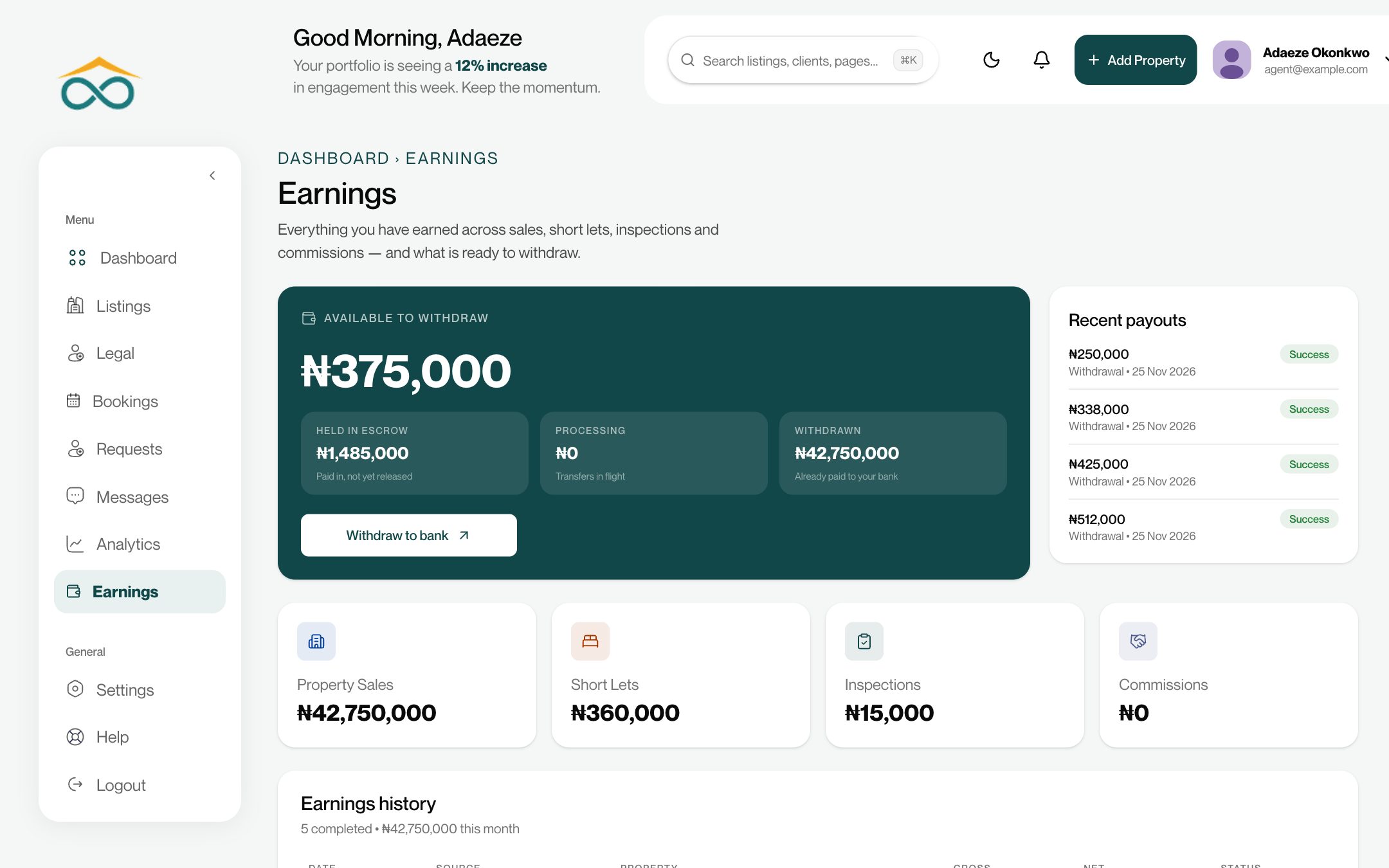
Read the page
Opening /earnings fires three requests: GET /api/v1/earnings?page=1&limit=10, GET /api/v1/earnings/wallet and GET /api/v1/earnings/payouts?page=1&limit=5.
-
Wallet card. "Available to withdraw" with the balance, then three tiles:
Tile Hint on screen Meaning Held in escrow "Paid in, not yet released" Earned but the escrow has not completed Processing "Transfers in flight" Requested, not yet confirmed by the payment provider Withdrawn "Already paid to your bank" Paid out The Withdraw to bank button is disabled while the wallet loads or when the balance is zero or less. With no saved account, a note reads "No payout account saved yet. You can enter one during withdrawal, or save it under Settings › Payments & Billing."
-
Recent payouts. The five latest transfers: amount, purpose, date and a status badge (
pending,processing,success,failed). A failed payout shows its failure reason.Purpose value Label wallet_withdrawalWithdrawal agent_commissionCommission payout seller_proceedsSale proceeds inspection_feeInspection fee platform_feePlatform fee platform_withdrawalPlatform withdrawal -
Earnings by source. Four cards: Property Sales, Short Lets, Inspections, Commissions.
-
Earnings history. Columns: Date, Source, Property (title and reference), Gross, Net, Status. Ten rows per page, with the page in the URL (
?page=2) and "Page X of Y • N entries" under the table. The sub-heading reads "N completed • (amount) this month".Earning status Meaning pendingDeal started, not yet paid fundedPaid into escrow, not yet released completedReleased, can be sent to the bank disputedHeld while a dispute is open cancelledDeal abandoned A row also shows "Sent to bank" when its payout succeeded, or "Transfer in progress" while one is processing.
Withdraw to a bank account
-
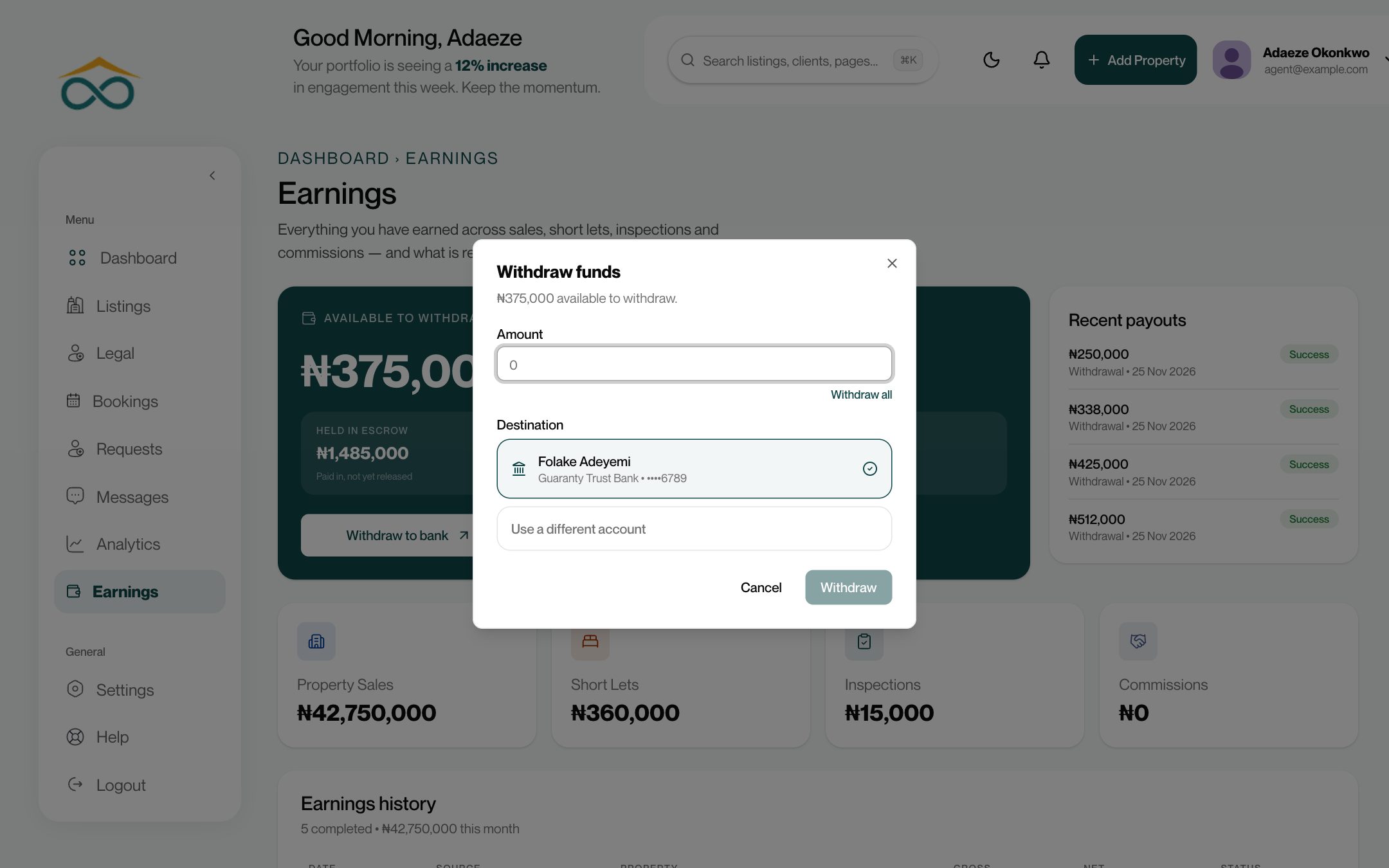
Press Withdraw to bank, or arrive from the global search action "Withdraw to bank" (
/earnings?action=withdraw). The "Withdraw funds" dialog opens, showing "(balance) available to withdraw." It loads the bank list withGET /api/v1/earnings/banks. -
Amount. Only digits and a dot can be typed. Withdraw all fills in the whole balance.
Rule Message Not a number, or zero or less "Enter a valid amount" More than the available balance "Amount exceeds your available balance" -
Destination. If a payout account is saved it is pre-selected and shown as the account name, bank and the last four digits. The second option reads Use a different account, or Enter bank account when nothing is saved.
-
One-off account. Choosing the second option reveals:
- Bank: a searchable list ("Search for your bank", "No banks found.").
- Account number: digits only, cut off at 10.
- Once a bank is chosen and 10 digits are entered, the app waits 500 ms and sends
POST /api/v1/earnings/banks/validatewith{ "accountNumber": "...", "bankCode": "..." }. It shows "Verifying account…", then the account holder's name in green. - On failure it shows the API message, or "Could not verify this account. Check the number and bank.", or "The bank did not return a name for this account."
-
Withdraw is enabled when the amount is valid and above zero, the destination is ready (a saved account, or a bank with a resolved name) and no lookup is running.
-
The app sends
POST /api/v1/earnings/withdraw. With the saved account the body is{ "amount": 50000 }. With a one-off account it also carriesaccountNumber,accountName,bankCodeandbankName. -
On success a toast reads "(amount) is on its way to your bank account.", the dialog closes, and the wallet, history and payouts refetch. On failure the toast shows the API message, or "Withdrawal failed. Please try again."
Checks repeated on the API:
| Rule | API message |
|---|---|
| Amount is rounded to a whole number and must be above zero | "Withdrawal amount must be greater than zero" |
| Amount must not exceed the wallet's available balance | "Insufficient balance. Available: N" |
| The destination must have a bank code | "A bank code is required for the payout account. Pick your bank from the list and try again." |
| The provider rejects the transfer | The provider's failure reason, or "Withdrawal failed" |
Send one earning to the bank
-
Click a row in Earnings history (or focus it and press Enter or Space). The "Earning details" dialog shows the net amount and status, then Source, Property, Paid by, Reference, Created, Completed, Gross and Platform fee.
-
A coloured line shows the transfer state when a payout exists:
Payout status Line success"Sent to your bank on (date) • Ref (reference)" pending,processing"Transfer in progress." failed"Last transfer failed: (reason) You can try again." -
If the earning is not
completed, the dialog says "Funds can be dispatched once this earning is completed." and offers only Close. -
If it is
completedand no transfer has succeeded or is processing, the dialog shows where the money will go ("Funds go to (account name) • (bank) (masked number)") and a Dispatch to bank button. After a failed transfer the button reads Retry bank transfer. -
The button is disabled, with a warning, when:
- No payout account is saved: "Save a payout account under Settings › Payments & Billing to dispatch these funds."
- The saved account has no bank code: "Your saved payout account has no bank selected. Re-select your bank under Settings › Payments & Billing to dispatch these funds."
- The net amount is zero.
-
Pressing it sends
POST /api/v1/earnings/{id}/dispatchwith{ "source": "escrow" }(orshortlet,inspection,commission). -
On success a toast reads "(amount) is on its way to your bank account." and the dialog closes. On failure the toast shows the API message, or "Could not dispatch funds. Please try again."
Dispatch is safe to repeat
States and edge cases
| Situation | What the user sees |
|---|---|
| Wallet loading | Skeleton bars in place of the balance and source values |
| History loading | Five skeleton rows |
| History failed | "Earnings could not be loaded. Please try again." |
| No earnings | "No earnings yet. Completed deals and paid inspections show up here." |
| No payouts | "No payouts yet. Your first withdrawal will show up here." |
| Listing was deleted | The Property column reads "Property removed" |
?page= is beyond the last page | The URL is pulled back to the last page once the response arrives |
| Dialog reopened | Amount, destination and account fields are reset each time |
| A payout changes state at the bank | Nothing updates live. Reload the page |
What happens next
- A withdrawal or dispatch appears in Recent payouts as
pendingorprocessing, and its amount moves into the Processing tile. - When the provider confirms it, the payout becomes
success, the amount moves to Withdrawn, and the earning row shows "Sent to bank". - A
failedpayout shows its reason. The earning can be dispatched again, and a withdrawal can be retried. - The balance is fed by completed escrows and paid inspections, see Escrow and Inspection requests.