 HomeLink Hub
Bookings and payment requests
The Bookings overview, the Payment Requests tab, and how a lister accepts or declines a buyer's request to pay.
Where it lives
| Route | View file | Access |
|---|---|---|
/bookings | src/views/app/bookings/bookings.tsx | agent, landlord |
/bookings?tab=reservations | same file, Property Reservations tab | agent, landlord |
/requests?tab=payments | src/views/app/requests/requests.tsx, src/views/app/requests/components/payment-requests-table.tsx | agent, landlord |
/payment-requests/:id | src/views/app/requests/payment-request-detail.tsx | the booking's landlord |
API calls are in src/services/bookings/booking-api.ts (base path /api/v1/booking).
Before you start
- Signed in as an agent or landlord.
- A payment request is a booking of type
reservationorshortletthat a buyer or tenant raised from the consumer app. The lister must accept it before the buyer can pay into escrow. - The list only returns bookings whose
landlordIdis the signed-in user, and only that user may accept one.
Status names
| API status | Requests tab and detail page | Bookings page |
|---|---|---|
requested | Pending | Pending |
confirmed | Accepted | Confirmed |
completed | Completed | Completed |
cancelled | Declined | Declined |
Flow
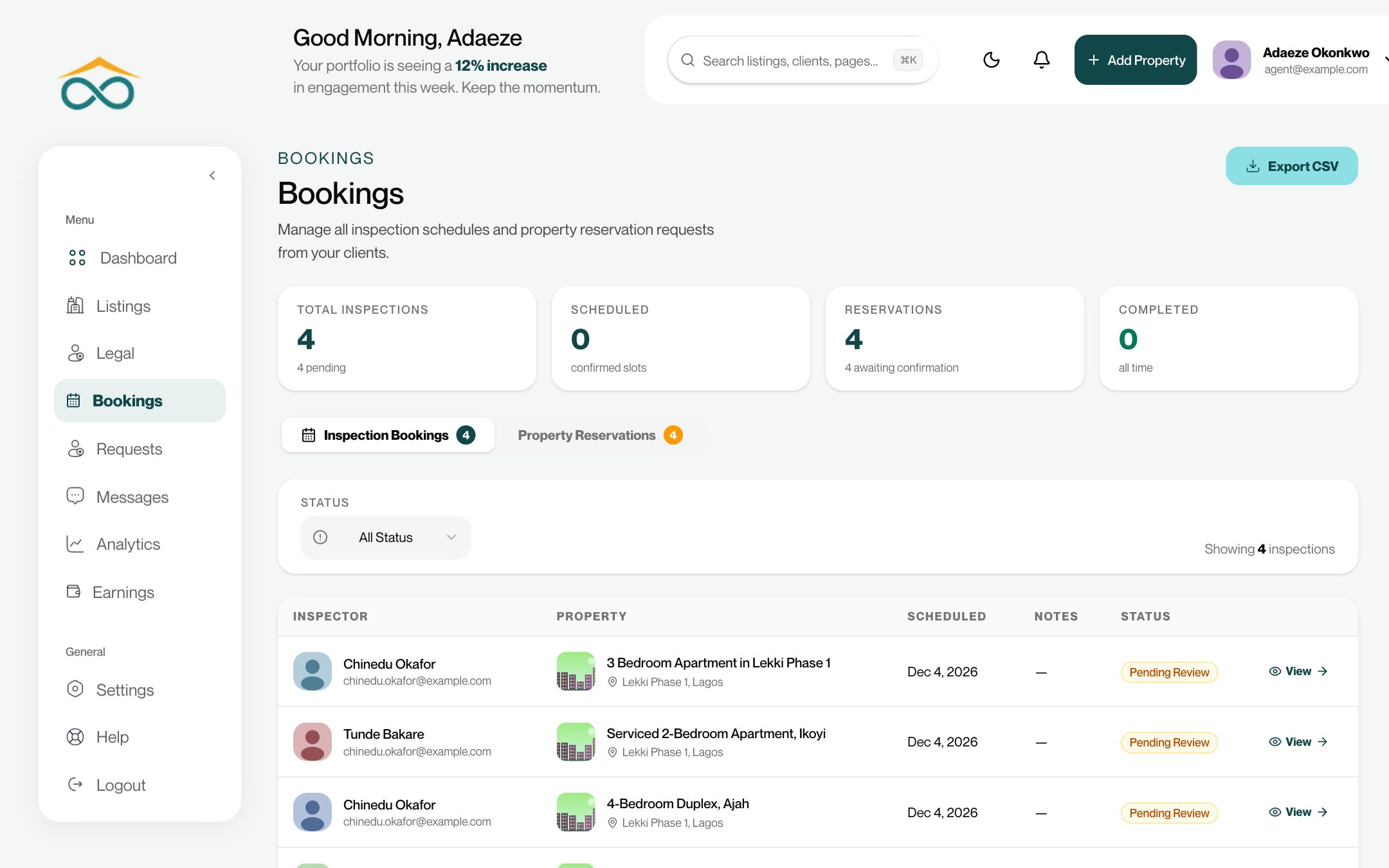
Bookings overview
/bookings is a read-only overview of everything clients have booked. It fires GET /api/v1/inspection/agent/requests and GET /api/v1/booking/landlord/payment-requests?page=1&limit=20.
-
Four summary cards:
Card Value Sub-text Total Inspections All inspections "N pending" ( pending_reviewplusin_progress)Scheduled Inspections in scheduled"confirmed slots" Reservations All payment requests loaded "N awaiting confirmation" ( requested)Completed Completed inspections plus completed reservations "all time" -
Two tabs: Inspection Bookings and Property Reservations, each with a count badge of pending items. The tab is kept in the URL as
?tab=reservations. -
A Status filter per tab, applied in the browser. Inspections: All Status, Pending Review, In Progress, Scheduled, Completed, Cancelled. Reservations: All Status, Pending, Confirmed, Completed, Declined. The card also shows "Showing N inspections" or "Showing N reservations".
-
Inspection rows show Inspector, Property, Scheduled, Notes and Status. Clicking a row opens
/requests/{id}, see Inspection requests. -
Reservation rows show Buyer / Tenant, Property, Date (requested date, plus "Confirmed (date)" once accepted), Price and Status. Clicking a row opens
/payment-requests/{id}.
Payment Requests tab
- Open Requests and choose Payment Requests (
/requests?tab=payments). The amber badge counts requests inrequested. - The Status filter (All Status, Pending, Accepted, Declined, Completed) is sent to the API:
GET /api/v1/booking/landlord/payment-requests?page=1&limit=20&status=requested. - Columns: Buyer / Tenant (name and email), Property, Amount (the listing's sale price, else its rent price, labelled "Purchase" or "Rent"), Status, Requested, and a Review link.
- Six rows per page in the browser, with
?page=in the URL. The footer reads "Showing X–Y of Z requests" and "page / pages". - Review opens
/payment-requests/{id}.
Only the first 20 are loaded
Review a payment request
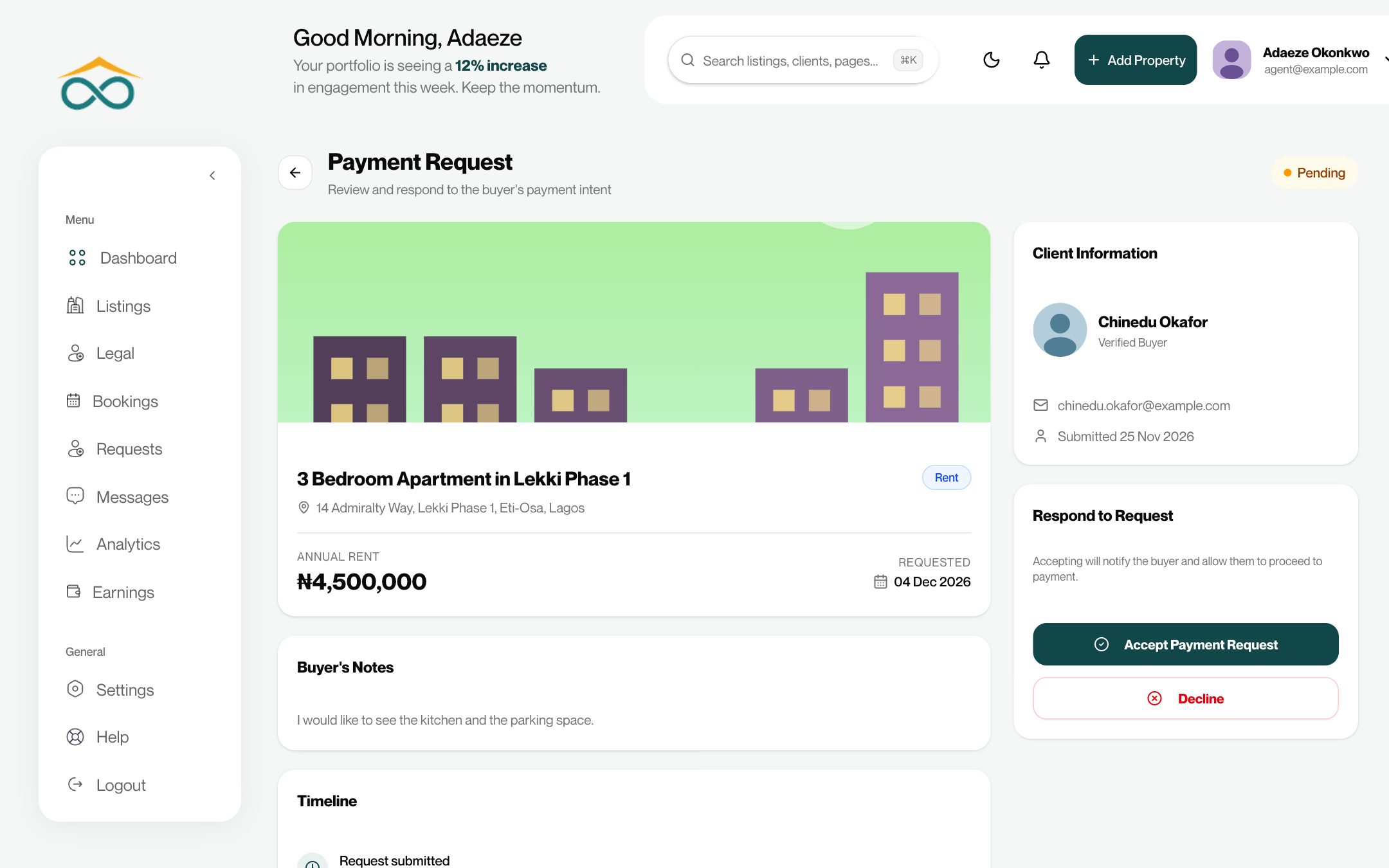
- The page loads
GET /api/v1/booking/{id}and is headed "Payment Request" with "Review and respond to the buyer's payment intent" and the status badge. - The property card shows the photo, title, full address and a Rent or Purchase badge. It is "Rent" when the listing has a rent price and no sale price. Below are "Annual Rent" or "Sale Price" and the Requested date.
- Buyer's Notes appears when the buyer wrote any.
- Timeline lists "Request submitted", then "Request accepted" (with the confirmed date) or "Request declined".
- Client Information shows the name, email, phone and "Submitted (date)". The "Verified Buyer" line is fixed text, not a check.
- Respond to Request shows only while the status is
requested.
Accept
- Press Accept Payment Request. The button reads "Accepting…" while it runs.
- The app sends
PATCH /api/v1/booking/{id}/confirmwith{ "confirmedDate": "(now, ISO)" }. - Toast: "Payment request accepted. The buyer can now proceed to payment."
- The status moves from
requestedtoconfirmed. The badge reads Accepted, the action card is replaced by a green "Request Accepted" card ("The buyer has been notified and can now proceed to escrow payment."), and the timeline gains "Request accepted". - On failure the toast shows the API message, or "Failed to accept request". The API answers "You do not have permission to confirm this booking" for anyone other than the booking's landlord.
Decline
- Press Decline. The "Decline Payment Request" dialog asks for a reason.
- Validation: an empty reason shows "Please provide a reason for declining." under the box. The API additionally requires 5 to 500 characters, and a shorter reason comes back as an error toast.
- Press Confirm Decline ("Declining…" while it runs). The app sends
PATCH /api/v1/booking/{id}/cancelwith{ "cancellationReason": "..." }. - Toast: "Payment request declined." The dialog closes.
- The status becomes
cancelled. The badge reads Declined, a red "Request Declined" card appears and the timeline gains "Request declined". Cancel closes the dialog and clears the text.
Short-let stays
Short-let bookings use the same lists and the same detail page, because the API treats both reservation and shortlet bookings as payment requests.
No short-let specific fields
States and edge cases
| Situation | What the user sees |
|---|---|
| Payment Requests tab loading | Spinner with "Loading payment requests..." |
| No payment requests | "No payment requests found." |
| Bookings page loading | Centred spinner in the table card |
| Empty Bookings tabs | "No inspection bookings found." or "No reservation bookings found." |
| Detail loading | Spinner with "Loading payment request…" |
| Unknown id or failed load | "Payment request not found." with a Go Back button |
Status is not requested | No action buttons, only the status card |
| A new request arrives | Appears after a reload. These screens have no realtime update |
What happens next
- Accepted: the buyer gets an in-app notification and email titled "Payment Request Accepted", saying they can now make payment. Their payment creates or funds an escrow, see Escrow.
- Declined: the buyer gets a notification ending in "Declined" with the reason the lister typed.
- Completed: once the deal's escrow completes, the money shows on
/earnings, see Earnings and withdrawals.