 HomeLink Hub
Listings overview
Browsing, filtering and deleting your listings, and reading the listing detail page.
Where it lives
| Route | View or component file | Access |
|---|---|---|
/listings | src/views/app/listings/listings.tsx | signed-in, agent or landlord |
| Table and pagination | src/views/app/listings/components/listings-table.tsx, listings-columns.tsx | same |
| Market Pulse popover | src/views/app/listings/components/market-pulse.tsx | same |
/listings/:id | src/views/app/listings/listing-detail.tsx | signed-in, agent or landlord |
API calls are in src/services/listings/listings-api.ts (RTK Query, base path /api/v1/property).
Before you start
- Signed in as an agent or landlord.
- The table only ever shows the signed-in user's own listings (
GET /api/v1/property/me), including private drafts.
Flow
Browse your listings
-
Open Listings in the sidebar. The page header reads "Properties Management" under the eyebrow "Portfolio Overview".
-
The app sends
GET /api/v1/property/mewithpage,limit=4and any active filters. The table shows four listings per page. -
Each row shows:
Column Content Checkbox Row selection. Nothing acts on the selection yet. Property Cover photo (first image), title, and "community, state" Price Currency code and amount, with "Per year" for a rent price or "Sale" otherwise Status A badge, mapped as below Actions Eye (Market Pulse), pencil (edit), bin (delete) -
Click the photo or title to open the listing detail page at
/listings/:id. -
Use the numbered buttons under the table to change page. The page number is kept in the URL (
?page=2), so a refresh stays put. The footer reads "Showing X to Y of Z entries".
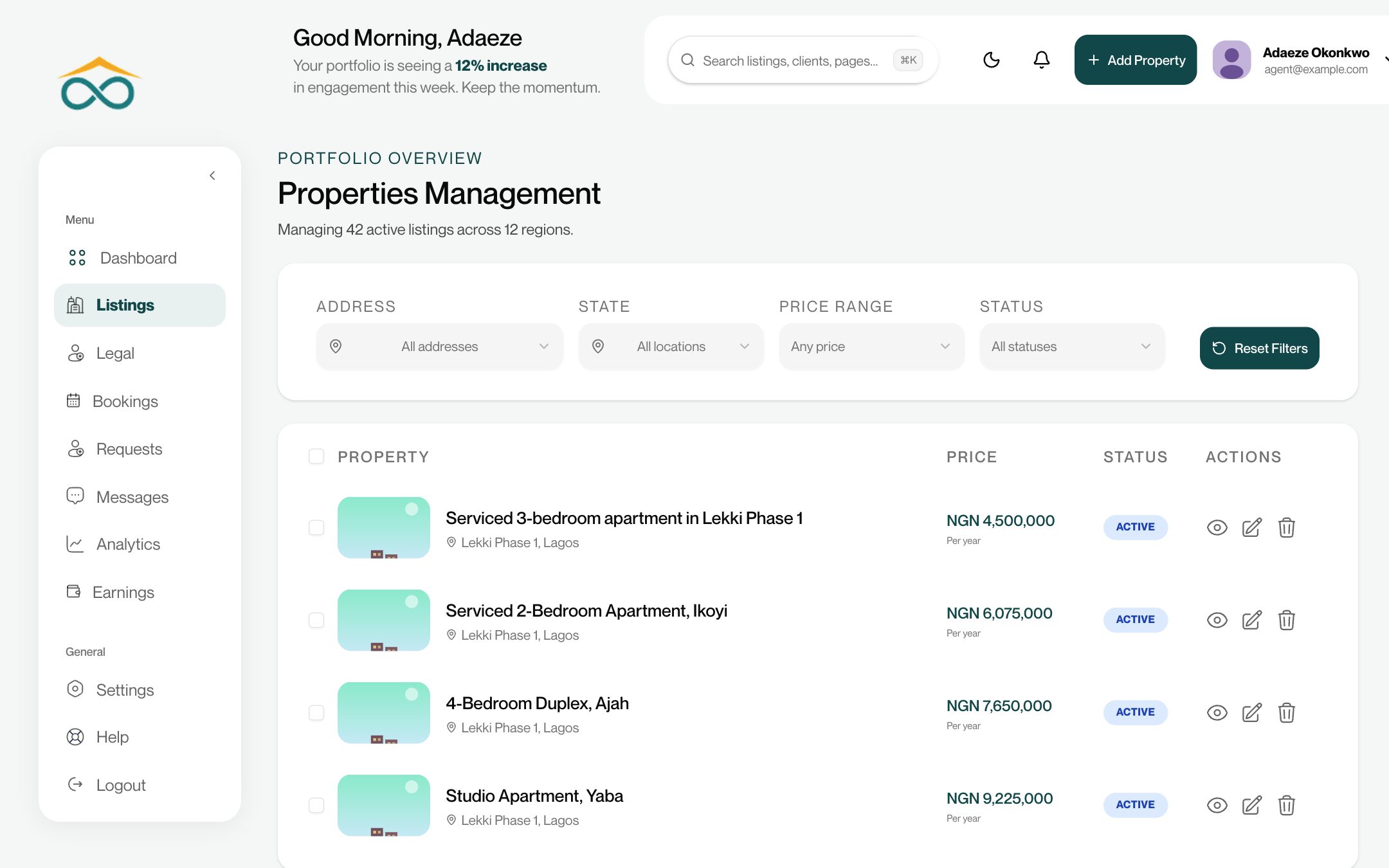
Status badges:
| API status | Badge |
|---|---|
listed | ACTIVE |
pending_verification | PENDING |
draft | DRAFT |
unlisted, rented, sold | INACTIVE |
The page description is placeholder text
DashboardHeader; it is not calculated from the user's listings.Filter the list
| Filter | Options | Query parameter sent |
|---|---|---|
| Address | "All addresses", then every state, community, street and landmark seen in previously loaded listings | address |
| State | "All locations", then every state seen in previously loaded listings | state |
| Price Range | "Any price", "Under $500k", "$500k – $2M", "$2M+" | minPrice and maxPrice (500000 and 2000000 as the boundaries) |
| Status | "All statuses", Active, Draft, Pending, Inactive | status (listed, draft, pending_verification, unlisted) |
- Changing any filter returns to page 1 and refetches.
- Reset Filters clears all four and returns to page 1.
- The Address and State options come from
localStorage(listings_addresses,listings_locations), refreshed every time a page of listings loads. They are read when a dropdown opens.
Filter quirks to know about
Market Pulse
Click the eye icon on any row to open a small popover. It is not specific to that listing: it summarises the whole account for the current week.
- Active Views and Direct Inquiries: sums of the weekly performance series (
GET /api/v1/dashboard/performance?view=weekly). - Active Listings: from
GET /api/v1/dashboard/stats. - A badge shows inquiries as a percentage of views ("N% engagement"), or "This week" when there are no views.
- View Full Report opens
/analytics.
Delete from the table
- Click the bin icon on a row.
- A dialog titled "Delete Listing" asks: "Are you sure you want to permanently delete" the listing title, and warns "This action cannot be undone and the listing will be removed from all public portals."
- Cancel closes it. Delete Listing sends
DELETE /api/v1/property/:id; the button shows "Deleting…". - Success toast: "Listing deleted successfully". The table refetches. Failure toast: "Failed to delete listing".
Listing detail page
Opening /listings/:id sends GET /api/v1/property/:id, plus GET /api/v1/legal/properties/:id/history and GET /api/v1/escrow/property/:id for the legal and escrow cards.
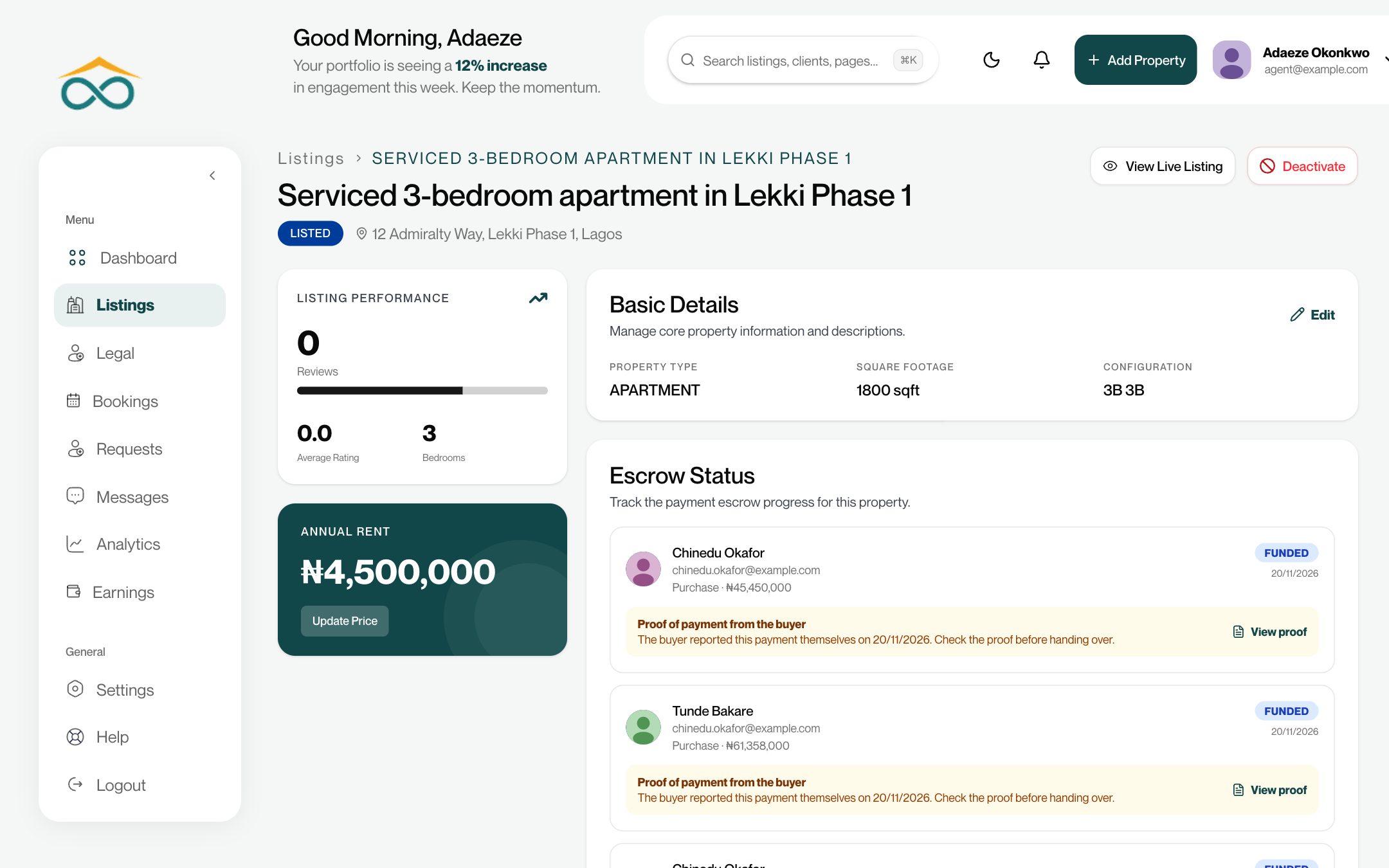
| Area | What it shows |
|---|---|
| Header | Breadcrumb "Listings", the title, a status badge with the raw API status, and "street, community, state" |
| Listing Performance | Review count, average rating and bedroom count |
| Price card | "Annual Rent" or "Sale Price" in naira, plus "Agent collects N years up front" when the rent term is 2 or 3 years |
| Basic Details | Property Type, Square Footage, Configuration (for example "3B 2B") |
| Escrow Status | Only when the listing has escrow transactions |
| Legal Verification | Legal status, assigned lawyer, document submission and assignment history. The Assign or Reassign button opens the lawyer picker |
| Media Gallery | The cover photo marked "Primary", a photo count, two thumbnails, and one tile per photo group when photos are tagged |
| Amenities | Preset labels and custom amenity names |
| Location | A map with a marker at the listing's coordinates, or "No location data available" |
| Listing Lifecycle | Four markers: Created, Submitted, Verified, Listed |
Clicking any photo opens a full-screen gallery with previous and next arrows and a thumbnail strip.
The legal and escrow cards are documented in the legal and payments sections.
Deactivate from the detail page
- Click Deactivate in the header.
- The dialog "Deactivate Listing" asks "Are you sure you want to deactivate this listing?"
- Deactivate sends
DELETE /api/v1/property/:id, the same request as deleting from the table. - Success toast: "Property deactivated successfully", then back to
/listings. Failure toast: "Failed to deactivate property".
Deactivate and Delete are the same call
DELETE /api/v1/property/:id. The client offers no separate "unlist" action; what the API does with the record (hard delete or soft delete) is not visible from this app.Several detail-page buttons are not wired up
/listings/:id/edit. The progress bar under the review count is decorative (it animates to a fixed 66%), and the "Submitted" lifecycle date always shows a dash.States and edge cases
- Loading. The table shows a spinner; the detail page shows a full-height spinner.
- Empty table. "No results." The footer then reads "Showing 1 to 0 of 0 entries".
- Detail not found or request failed. "Failed to load listing" with a Back to Listings button.
- No photos. The table uses a placeholder image; the detail page shows "No images uploaded".
- Page out of range. If the URL says page 5 but only 2 pages exist, the page is pulled back to the last one once the response arrives.
- Listings from before photo tagging. The per-group tiles are hidden when no photo has a tag.
What happens next
- Deleting a listing invalidates the listings cache, so the table and global search update.
- To change a listing, continue to Edit and publish listings. To add one, see Create a listing.