 HomeLink Hub
Help Centre
The public Help Center with its search, topic categories, articles and FAQs, all served from static content in the app.
The Help Center is a public, read-only knowledge base. All of its text lives in one content file in the repository, so it works without the API and changes only when the app is rebuilt and deployed.
Where it lives
| Route | View / component file | Access |
|---|---|---|
/help | src/views/landing/help.tsx | public |
/help/category/:categorySlug | src/views/landing/help-category.tsx | public |
/help/article/:articleSlug | src/views/landing/help-article-detail.tsx | public |
Content and lookup helpers: src/content/help-content.ts (helpCategories, helpArticles, helpFaqs, helpPopularSearches, searchHelpContent).
Entry points: Help Center in the account menu, the mobile drawer and the footer; the Help Center tile on /support; and the refunds link on /pricing.
Before you start
- No account is needed.
- To change or add an article, edit
src/content/help-content.ts. Each article needs a uniqueslug, acategorySlugthat matches a category, atitle, asummaryandsections(an optional heading plus paragraphs). The build also generates a page with its own search-engine tags for every category and article from this file.
Flow
Search the Help Center
- On
/help, under "How can we help you today?", type in the search box ("Search for inspections, escrow, or account help..."). - Results appear in a dropdown as the user types. The search runs in the browser and matches, case-insensitively, any article whose title or summary contains the text and any FAQ whose question contains it.
- Clicking an article result opens
/help/article/:articleSlug. Clicking an FAQ result opens the article that FAQ links to. - With no match the dropdown reads
No results for "QUERY". - Popular chips under the box jump straight to an article: Book an inspection, How escrow works, Refunds and disputes and Verify my identity.
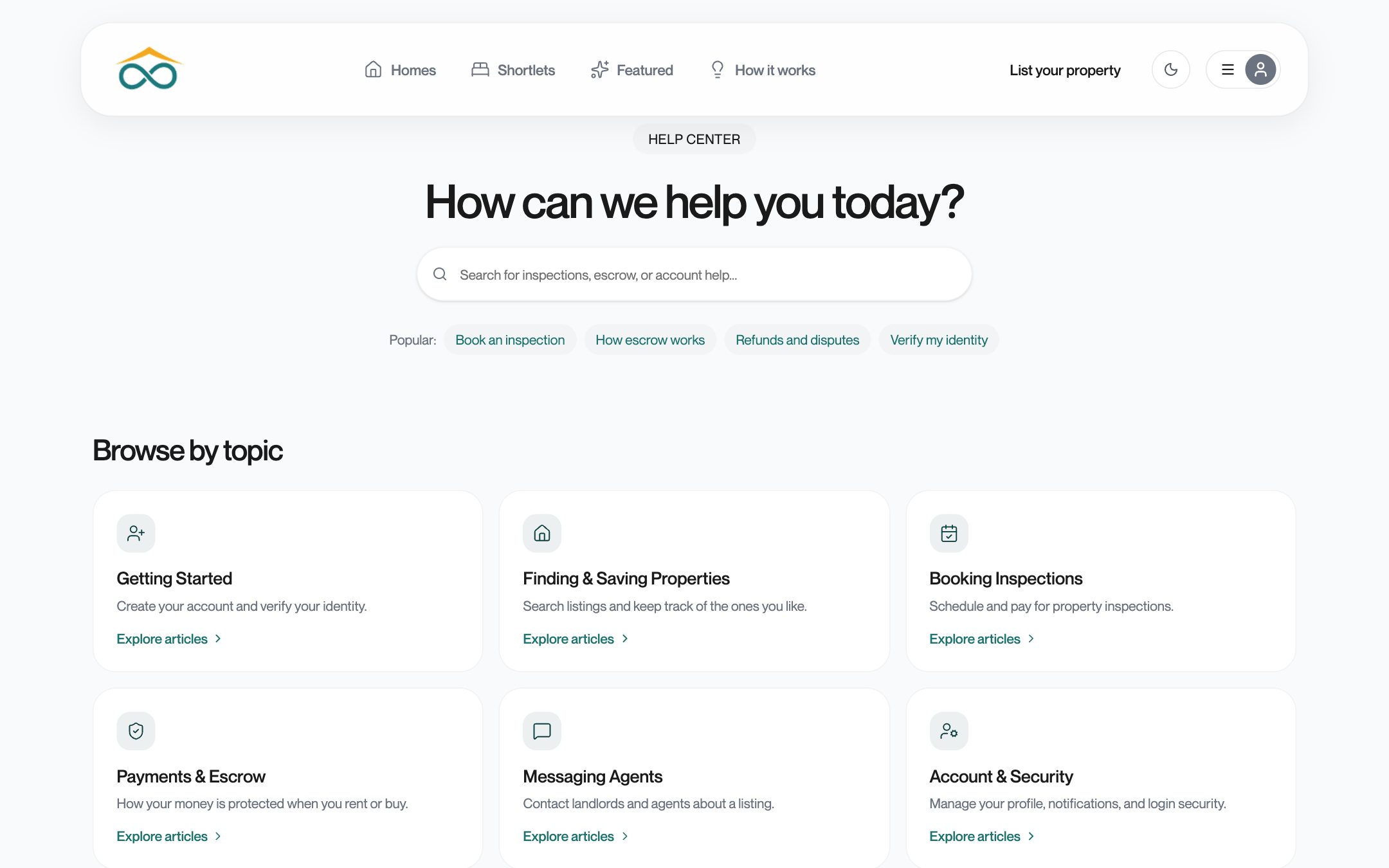
Browse by topic
- Browse by topic shows six category cards. Clicking a card opens
/help/category/:categorySlug. - The category page shows a breadcrumb (Help Center, then the category), the category's title and description, and a list of its articles with their summaries.
- Clicking an article opens it. Back to Help Center returns to
/help.
Categories and their articles:
| Category (slug) | Articles |
|---|---|
Getting Started (getting-started) | Creating your account; Verifying your identity (KYC) |
Finding & Saving Properties (property-search) | Searching for properties; Saving properties to your wishlist |
Booking Inspections (inspections) | Booking a property inspection; If your inspection payment doesn't go through |
Payments & Escrow (payments-escrow) | How escrow protects your payment; Understanding escrow fees; Cancellations, refunds and disputes |
Messaging Agents (messaging) | Contacting a landlord or agent; Staying safe when messaging |
Account & Security (account-security) | Updating your profile and notifications; Password, two-factor authentication & account deletion |
Read an article
- The article page shows a three-level breadcrumb (Help Center, category, article), the title and summary, then each section's heading and paragraphs.
- More in CATEGORY lists the other articles in the same category.
- Back to Help Center returns to
/help.
Frequently asked questions
/helpends with a five-question accordion: booking an inspection, how escrow protects a payment, whether KYC is needed, cancelling a booking, and contacting an agent about a property.- Only one answer is open at a time. Each answer has a Read full article link to its related article.
Contact support
The Still need help? panel has an Email Support button that opens a mailto: link to the support address. There is no ticket form, live chat or phone line in this app.
States and edge cases
- Unknown category. "Category not found" with Back to Help Center.
- Unknown article. "Article not found" and "This help article may have been moved or removed." with Back to Help Center.
- Search engines. Both not-found states add a
noindexrobots tag, because the host answers every URL with the app and a 200 status. - Empty category. "No articles in this category yet."
- No loading or error states. Nothing is fetched; content is bundled with the app.
- Browser tab. "Help Center", "CATEGORY – Help Center" or "ARTICLE – Help Center", each followed by the site name.
- Search scope. Article body text is not searched, only titles, summaries and FAQ questions. An FAQ with no linked article would appear in results but do nothing when clicked; all five current FAQs have a link.
- Signed-in users see the same content; nothing is personalised.
Help text can drift from the product
Articles are hand-written and describe intended behaviour. Where an article and the app disagree, for example on when KYC is checked or how refunds are handled, the code and the backend decide what actually happens. Review this file whenever one of those flows changes.
Related pages
/supportis a separate, shorter page aimed at mobile app users (it is the support URL on the store listings). It is described under Landing pages.- The home page has its own four-question FAQ block, kept in
src/components/landing/faq.tsx, not in the help content file.
Wallet and My Properties
The My Properties page for properties being rented or bought through escrow, and the Wallet page, which is currently a static mock-up.
Link Previews
The small Node server that serves the built web app and gives shared links, especially listing links, a proper title, description and preview image.