 HomeLink Hub
Tenant Web App
How the public, tenant-facing HomeLink Hub web app is put together, with a map of every route and the navigation that ties the pages together.
The tenant web app (app/ in the workspace) is the public site at the root domain. Visitors browse and search listings without an account; signing in unlocks tour requests, payment requests, escrow, wishlist, messages and account settings. Landlords and agents do not list here: every "List your property" link opens the separate agent dashboard (client app) in a new tab.
It is a single-page app built with React 19, Vite, react-router (createBrowserRouter), Redux Toolkit with RTK Query, Socket.IO and shadcn UI. In production a small Node server (app/server) serves the built files and adds link previews, see Link previews.
Where it lives
Routes are declared in src/routes/router.tsx, which mounts four route groups.
| Route | View / component file | Access | Covered in |
|---|---|---|---|
/ | src/views/landing/index.tsx | public | Landing pages |
/how-it-works | src/views/landing/how-it-works.tsx | public | Landing pages |
/featured | src/views/landing/featured.tsx | public | Landing pages |
/about | src/views/landing/about.tsx | public | Landing pages |
/careers | src/views/landing/careers.tsx | public | Landing pages |
/pricing | src/views/landing/pricing.tsx | public | Landing pages |
/mobile-app | src/views/landing/mobile-app.tsx | public | Landing pages |
/support | src/views/landing/app-support.tsx | public | Landing pages |
/become-an-agent | src/views/landing/become-an-agent.tsx | public | Landing pages |
/privacy-policy | src/views/landing/privacy-policy.tsx | public | Landing pages |
/terms | src/views/landing/terms-and-condition.tsx | public | Landing pages |
/help | src/views/landing/help.tsx | public | Help centre |
/help/category/:categorySlug | src/views/landing/help-category.tsx | public | Help centre |
/help/article/:articleSlug | src/views/landing/help-article-detail.tsx | public | Help centre |
/auth/signin | src/components/login-form.tsx | public | Sign up and sign in |
/auth/signup | src/views/auth/signup.tsx | public | Sign up and sign in |
/auth/forgot-password | src/components/auth/forgot-password-form.tsx | public | Sign up and sign in |
/auth/check-email | src/components/auth/check-email.tsx | public | Sign up and sign in |
/auth/verify-email | src/components/auth/verify-mail.tsx | public (email link) | Sign up and sign in |
/auth/reset-password | src/components/auth/new-password.tsx | public (email link) | Sign up and sign in |
/auth/reset-success | src/components/auth/reset-success.tsx | public | Sign up and sign in |
/auth/google/callback | src/views/auth/google-callback.tsx | public (Google redirect) | Sign up and sign in |
/app | src/views/app/index.tsx | public | Search and browse |
/app/search | src/views/app/search-results.tsx | public | Search and browse |
/app/property/:id | src/views/app/property-detail-view.tsx | public, actions need sign-in | Property details |
/app/inspections | src/views/app/inspections.tsx | signed-in | Tour requests and inspection payment |
/app/inspections/verify | src/views/app/inspection-payment-verify.tsx | signed-in (Paystack redirect) | Tour requests and inspection payment |
/app/property/:id/escrow | src/views/app/escrow-payment-status.tsx | signed-in | Booking and escrow payment |
/app/property/:id/escrow/:escrowTxId | src/views/app/escrow-payment-status.tsx | signed-in | Booking and escrow payment |
/app/property/:id/escrow/success | src/views/app/escrow-payment-success.tsx | signed-in | Booking and escrow payment |
/app/escrows | src/views/app/escrow-transactions.tsx | signed-in | Booking and escrow payment |
/payment/complete | src/views/payment-complete.tsx | public (checkout redirect) | Booking and escrow payment |
/app/wishlist | src/views/app/wishlist.tsx | signed-in | Wishlist |
/app/property/:id/message | src/views/app/message-agent.tsx | signed-in | Messages |
/app/notifications | src/views/app/notifications.tsx | signed-in | Notifications |
/app/account | src/views/app/account.tsx | signed-in | Account and settings |
/app/properties | src/views/app/my-properties.tsx | signed-in | Wallet and My Properties |
/app/wallet | src/views/app/wallet.tsx | signed-in | Wallet and My Properties |
Layouts (src/components/layout/):
| Layout | Routes | What it adds |
|---|---|---|
public-layout.tsx | / and the marketing pages | Navbar, footer, auth modal, scroll restoration |
auth-layout.tsx | /auth/* | Two-column page: photo panel with headline on large screens, form on the right. No navbar |
app-layout.tsx | /app/* | Navbar, footer, auth modal, scroll restoration, and the first-visit app tour |
| none | /payment/complete | Standalone page, no navbar |
Signed-in is not enforced by the router
There are no route guards. "Signed-in" in the table means the page only works with a session: a signed-out visitor can still open the URL, and the page then shows its own error or empty state, or is bounced to /auth/signin if the API answers 401 with a token message.
Before you start
How a session is held (see src/hooks/storage.ts, src/services/auth/):
| Where | Key | Holds |
|---|---|---|
sessionStorage | token | Access token (JSON-encoded). Gone when the tab closes |
localStorage | refreshToken | Refresh token |
localStorage | user | The signed-in user object (name, email, avatar) |
localStorage | notifications | Notifications received over the socket |
localStorage | hl_tours_seen | Which users have seen the app tour |
localStorage | vite-ui-theme | Light or dark theme choice |
Redux auth slice | user, token, authView, authModalOpen | Live session state; useIsLoggedIn() reads auth.token |
API access:
- All REST paths are under
/api/v1on the API origin (from the build environment). - Auth calls use an axios instance (
src/config/axios.ts). Everything else uses RTK Query APIs built withcreateBaseQuery(src/config/base-query.ts):propertyApi,userApi,chatApi,wishlistApi,paymentApi,settingsApi,calendarApi. Both attachAuthorization: Bearerwith the stored token. - Realtime uses one shared Socket.IO connection to the API origin (
src/services/chat/socket.service.ts), authenticated with the same token, with up to 5 reconnection attempts 2 seconds apart.
Flow
Navbar when signed out
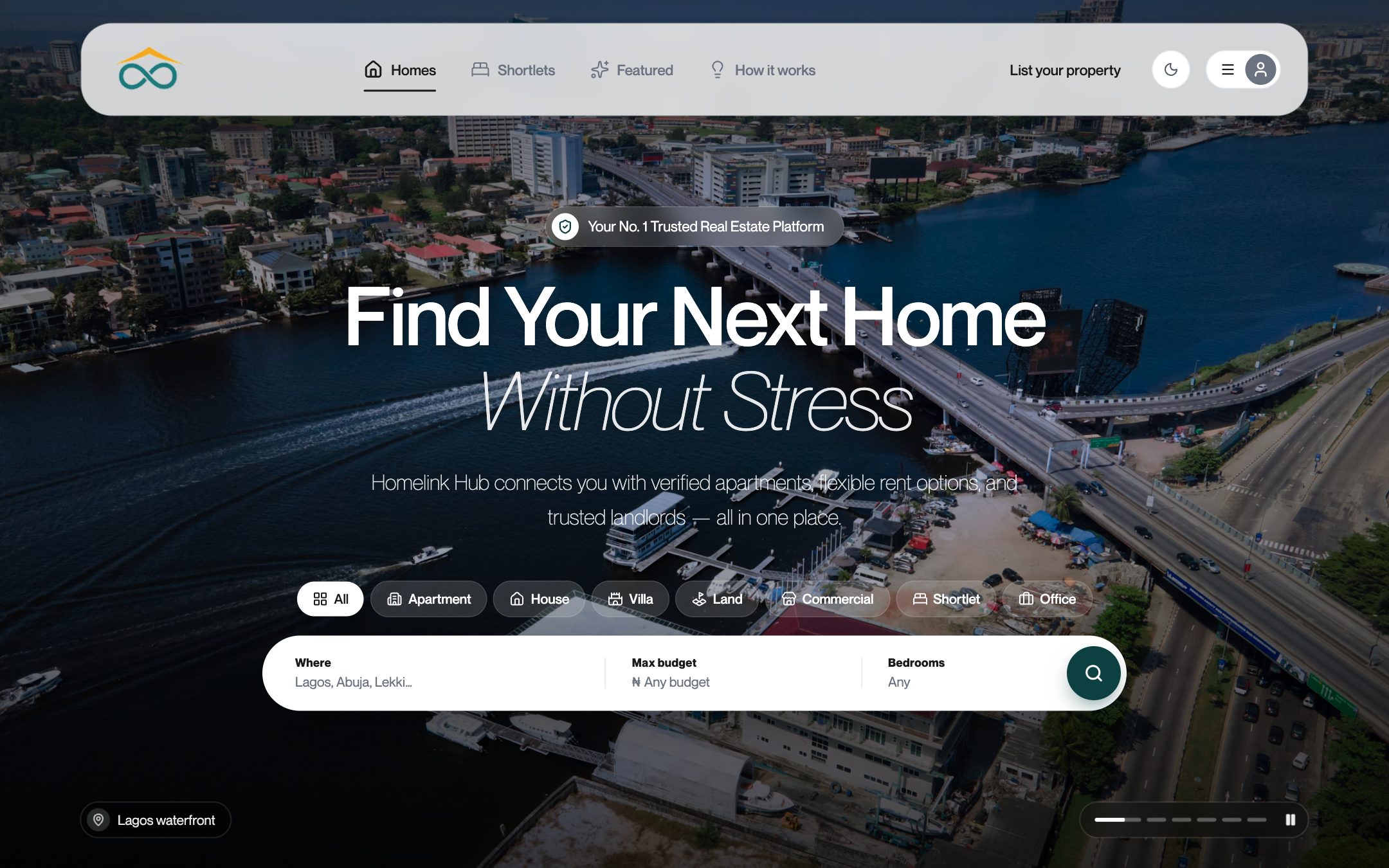
- At the top of a page the navbar is one wide pill: logo (links to
/), centre tabs Homes (/), Shortlets (/app/search?type=SHORTLET), Featured (/featured) and How it works (/how-it-works, extra-wide screens only), then List your property (opens the agent dashboard sign-up in a new tab), the theme toggle and the account menu button. - After scrolling 24px the bar splits into separate pills and a compact search pill appears reading Anywhere, Any type, Any budget (or the current search criteria from the URL).
- Clicking the compact pill (or the search icon on phones) opens a panel titled Where would you like to live? containing the same search form as the home hero. It closes on Escape, on the close button, on a click outside, or once the page scrolls more than 120px.
- The account menu shows Sign up, Log in, the List your property card, any tabs hidden at the current width, and Help Center. Sign up and Log in open the auth modal over the current page.
Navbar when signed in
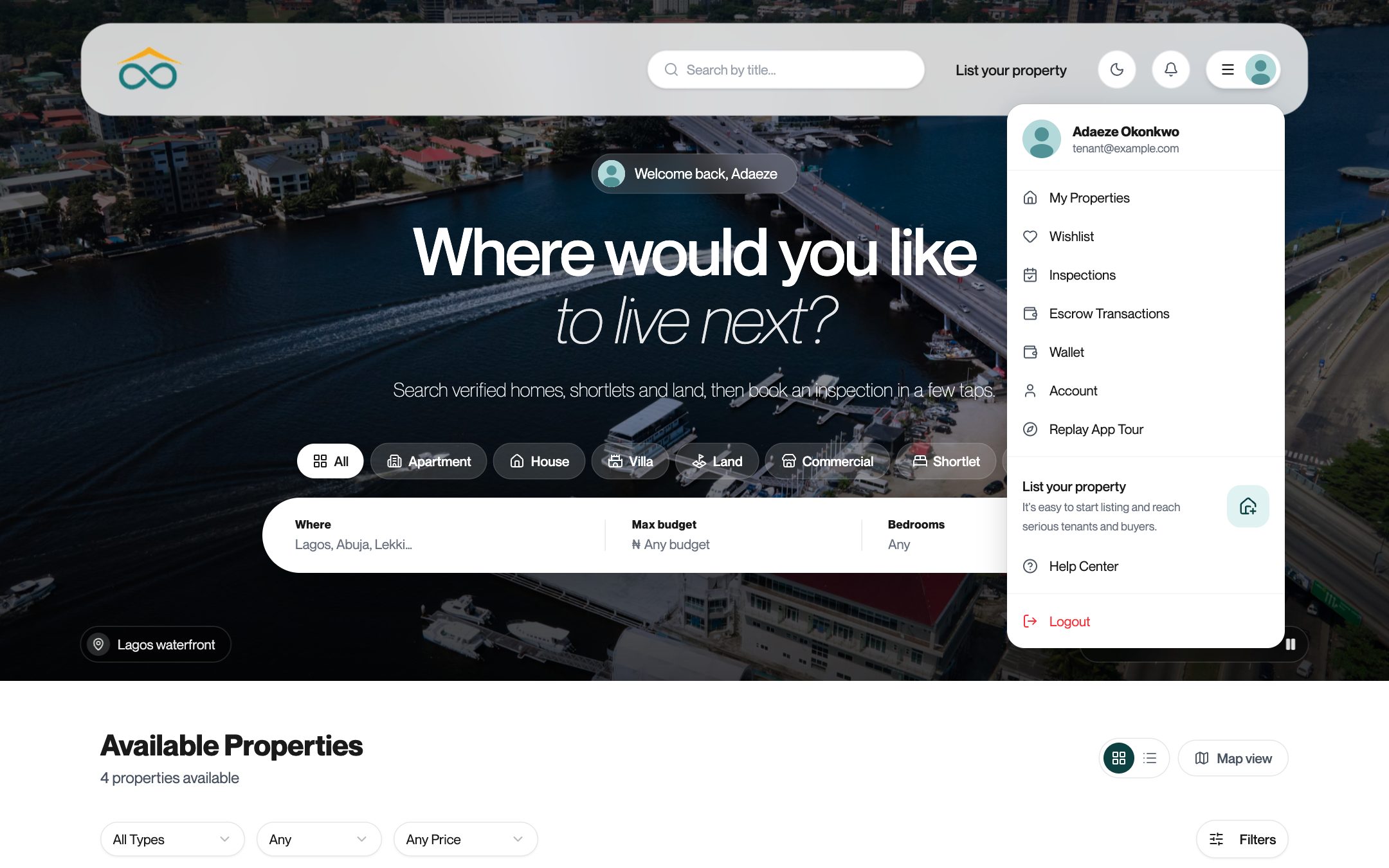
- The logo links to
/appand the centre tabs are hidden. - A search box with the placeholder Search by title... submits to
/app/search?title=.... Its clear button empties the box and goes to/app/search. - A filter button (hidden on
/and/app) opens Filter Properties: type pills (All, Apartment, House, Villa, Land, Commercial, Shortlet, Office), Max Price (₦), Location, and Bedrooms (hidden for Land and Office). Search goes to/app/searchwithtype,price,locationandroomsquery params. - The bell shows the unread count from
localStorage(capped at 99+). Clicking it marks every stored notification as read and opens/app/notifications. - The account menu shows the user's name and email, then My Properties, Wishlist, Inspections, Escrow Transactions, Wallet, Account, Replay App Tour (inside
/app/*only), List your property, Help Center and Logout.
Mobile menu
Below the md breakpoint the account button opens a right-hand drawer titled Menu. Signed in, it holds the title search, the Filter Properties fields, Notifications, the profile links, Replay App Tour, List your property, a Dark mode / Light mode row and Logout. Signed out, it holds the browse tabs, the List your property card, Sign up, Log in, Help Center and the theme row.
Footer
Three link columns: Platform (How it works, Pricing, Property Search to /app, Become an Agent), Company (About, Pricing & Fees, Careers) and Support (Help Center, Mobile App, Privacy, Terms). The Facebook icon links to # and the ENGLISH (US) and NGN (₦) labels are static text.
First-visit app tour
src/components/tour/ runs a spotlight walkthrough the first time a signed-in user lands on exactly /app.
- It starts about 0.9 seconds after the page loads, once the hero search is on screen (it retries up to 15 times, 300ms apart).
- Steps, in order: Find your next home (hero search), Browse your way (view toggles), Narrow it down (Filters button), Stay in the loop (bell), Your account (account menu) and, on phones, Everything in one menu (menu button). A step whose target is not visible at the current screen size is left out.
- The card shows
Step N of Mwith Skip tour, Back and Next; the last step's button reads Get started. Escape skips; the arrow keys move between steps. The page underneath cannot be clicked while it runs. - Finishing or skipping writes
tenant:USER_IDtohl_tours_seeninlocalStorage, so it does not run again for that user in that browser. Signing out does not clear it. - Replay App Tour in the account menu navigates to
/appand runs it again.
Theme
The sun/moon button toggles light and dark mode (default light) and stores the choice in localStorage.
States and edge cases
- Pre-loader. Every full page load shows a branded splash ("HomeLink Hub", "Finding your perfect home…") for a fixed 2 seconds before the router renders.
- Expired or invalid session. Any API response with status 401 whose message contains "token" clears the Redux session, removes
token,refreshTokenanduserfrom storage and hard-redirects to/auth/signin. There is no silent token refresh: arefreshTokenthunk exists (POST /api/v1/auth/refresh-token) but nothing calls it. - Closing the tab. The access token lives in
sessionStorage, so a new tab or window starts signed out even thoughuseris still inlocalStorage. - Unknown URLs and crashes.
src/views/error-view.tsxshows "Oops! Something went wrong" with Go to Homepage and Refresh Page, and adds anoindexrobots tag. - Toasts appear top-right (sonner).
Token format differs between the two API clients
The token is stored JSON-encoded. RTK Query parses it before use, but the axios request interceptor reads the raw sessionStorage value, so axios calls made while signed in (in practice only sign-out) send the token wrapped in quotes. Check sign-out against the backend when testing.