 HomeLink Hub
Booking and Escrow Payment
Requesting payment for a rental or purchase, booking a short-let stay, paying through escrow or direct payment, tracking the escrow and releasing funds.
Paying for a property is a two-stage flow. The tenant first sends a request that the agent or landlord must accept; only then does Pay Now unlock. Payment normally goes into escrow with Pandascrow and is released when the tenant confirms the handover with a one-time code. An admin setting can switch the platform to direct Paystack payment instead.
Where it lives
| Route | View / component file | Access |
|---|---|---|
/app/property/:id (Request Payment and Pay Now dialogs) | src/components/landing/property-detail.tsx | signed-in |
/app/property/:id (short-let booking card) | src/components/landing/shortlet-booking-card.tsx | signed-in to request |
/app/property/:id/escrow/:escrowTxId | src/views/app/escrow-payment-status.tsx | signed-in |
/app/property/:id/escrow | src/views/app/escrow-payment-status.tsx | signed-in |
/app/property/:id/escrow/success | src/views/app/escrow-payment-success.tsx | signed-in |
/app/escrows | src/views/app/escrow-transactions.tsx | signed-in |
/payment/complete | src/views/payment-complete.tsx | public, opened by the checkout redirect |
Requests are in src/services/property/property-thunk.ts (booking) and src/services/payment/payment-thunk.ts (escrow and direct payment).
Before you start
- Signed in.
- The listing is not sold or rented.
GET /api/v1/settingsdecides the payment mode (ESCROWorDIRECT) and the fee percentages. Until it loads the page assumes escrow, a 1% platform fee and a 5% agent commission.- Pay Now only appears once the latest request for this listing has status
confirmed. The property page pollsGET /api/v1/booking/property/:id/payment-requestevery 15 seconds to pick that up.
Flow
Request payment (rent or purchase)
- On a long-term listing click Request Payment.
- The dialog shows the listing title, location and price, a Transaction Type of Rent or Purchase (derived from the listing's pricing, not chosen by the user) and Note to Agent (optional), limited to 300 characters.
- Send Payment Request (reads "Sending Request…" while busy) fires
POST /api/v1/booking/createwithpropertyId,type: "reservation", arequestedDate30 days from today andnotes(the typed note, or "Rent request" / "Purchase request"). - Success: the dialog closes, the toast "Payment request sent! Awaiting agent/landlord acceptance." shows and the button becomes "Awaiting Response…".
- Failure: the server's message (or "Failed to send request.") shows in the dialog and as a toast.
- If the request is declined the button returns as Request Payment with "Previous request was declined".
Request a short-let stay
- The booking card fires
GET /api/v1/property/:id/availabilityand shows the nightly price and, when a maximum is set, the allowed range such as "2–14 nights". - Pick check-in and check-out on the calendar. Past days and already booked nights are disabled.
- The summary shows Check-in, Check-out and "PRICE × N nights" with the total. A stay shorter than the minimum shows "Minimum stay is N nights"; longer than the maximum shows "Maximum stay is N nights".
- The button reads "Select check-in and check-out dates" until a valid range is chosen, then Request N nights. A signed-out visitor who clicks it gets the "Sign In Required" alert.
- It fires
POST /api/v1/booking/createwithpropertyId,type: "shortlet",checkInandcheckOut(dates asyyyy-mm-dd). - Success: toast "Stay requested! Awaiting host confirmation." and the card shows "Awaiting host response…".
- Failure: a 409 response shows "Those dates have just been taken. Please choose others."; anything else shows the server's message or "Failed to send booking request."
- Once confirmed the card reads "Your stay is confirmed — TOTAL total." with Pay Now. If declined: "Your previous request was declined. You can request new dates below."
Pay now
- Click Pay Now. The dialog "Initiate Escrow Payment" lists the listing, the Transaction Type (Rent, Purchase or Stay) and a breakdown:
- Property Price (or Stay Total, the confirmed booking's total, with the number of nights).
- Platform Fee (N%).
- Agent Fee (N%), only for a purchase of a listing that has an agent, with the note "The agent fee is paid to the listing agent from the sale proceeds and is not added to your total."
- Total Amount: the base amount plus the platform fee.
- An explainer reads "How Escrow Works" (fund the escrow, the owner or agent is notified, funds are released after handover) in escrow mode, or "Direct Payment" ("You will be redirected to Paystack to complete your payment securely.") in direct mode.
- The primary button reads Proceed to Escrow or Proceed to Direct Payment ("Initializing..." while busy).
- Escrow mode fires
POST /api/v1/escrow/initializewith anescrowDataobject:propertyId,transactionType,amount(the base amount, without the fee),currency, a title and description,buyer_details(from the stored user),seller_details(from the listing's landlord or agent), a 7-dayinspection_period, adelivery_date30 days out,who_pay_fees: "buyer"and a bank payout type.- If the response includes
payment_url, it opens in a new tab with the toast "Escrow initialized! Complete payment in the new tab." Otherwise the toast reads "Payment request sent. Awaiting agent confirmation." - If the response includes
escrowTransactionId, the original tab navigates to/app/property/:id/escrow/:escrowTxId.
- If the response includes
- Direct mode fires
POST /api/v1/transaction/booking/initializewithpropertyIdandamount. The returnedauthorization_urlopens in a new tab with the toast "Direct payment initialized! Complete payment in the new tab."; with no URL the toast is "Failed to get payment URL." - Any failure shows the server's message (or "Failed to initialize payment.") in the dialog and as a toast. "Price not available for this property" appears if the amount is zero.
Fund and track the escrow
The tracking page fires GET /api/v1/escrow/my/:escrowTxId.
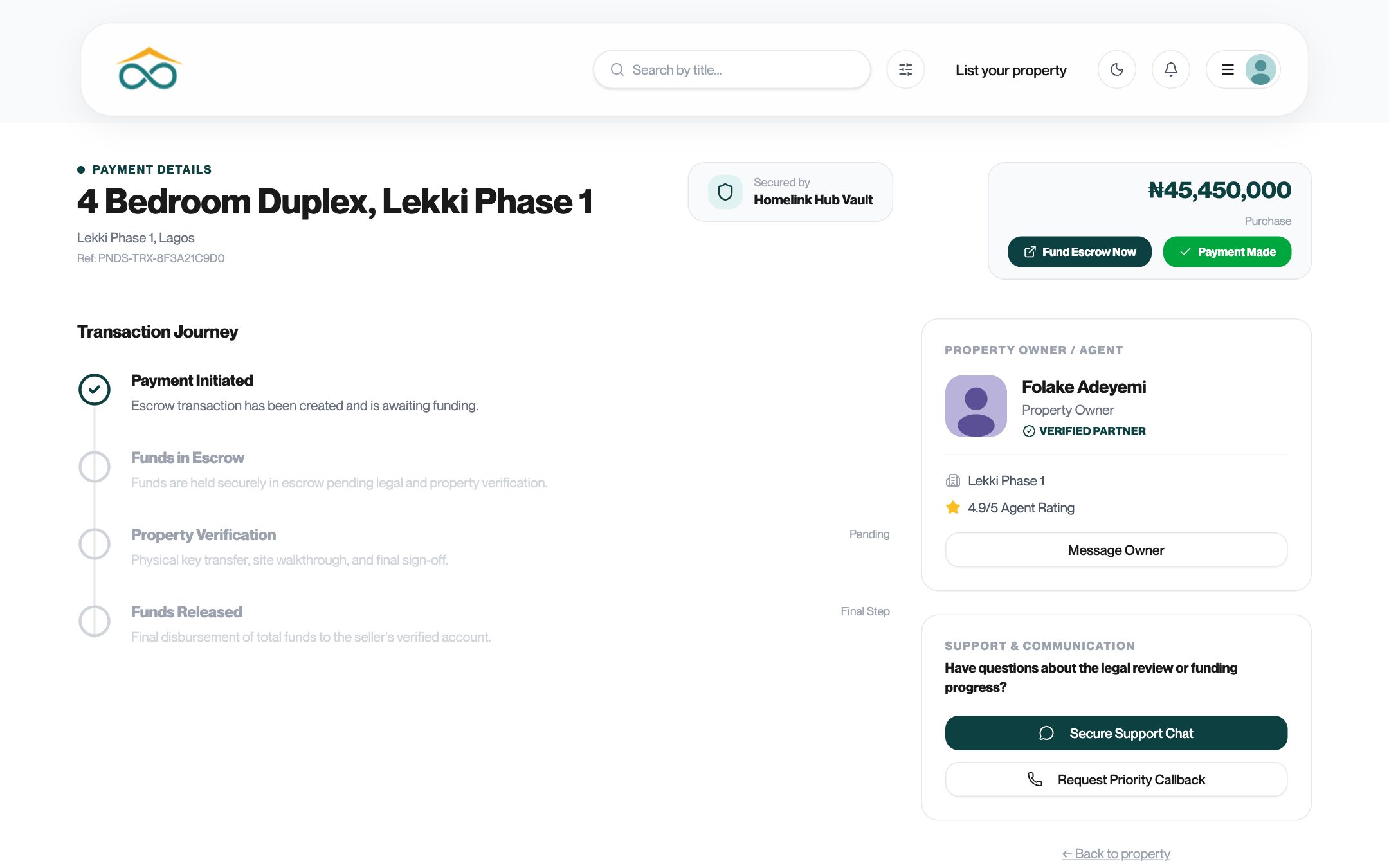
- The header shows the listing title and location, "Ref: TRANSACTION_REF", a "Secured by Homelink Hub Vault" badge, the amount and the transaction type.
- While the status is
pending: Fund Escrow Now (opens the stored checkout link in a new tab, when there is one) and Payment Made. - Transaction Journey shows four steps: Payment Initiated, Funds in Escrow, Property Verification and Funds Released. With status
fundedthe second step is marked ACTIVE and "In Progress"; withcompletedall are done. Fordisputedorcancelledevery step shows as not started. - The sidebar shows the seller ("Property Owner / Agent") with Message Owner, and Secure Support Chat; both open the listing's message page. ← Back to property returns to the listing.
- The page refreshes itself when the server pushes a socket event
escrow:status_updatedfor this transaction (toastEscrow status updated to "STATUS". Refreshing...) and when the checkout tab reports back (next section).
The checkout return tab (/payment/complete)
- When Pandascrow's checkout finishes, it redirects the payment tab here with
status,type,refandcheckout_idquery params. - The page tells the original tab to refetch, through a
BroadcastChannelnamedhomelinkhub:escrow-paymentand apostMessageto the opener. - If
statuscontains fail, cancel, abandon, declin or error, it shows Payment not completed and "Your payment didn't go through and you haven't been charged. Close this tab and try again from your escrow page." with Close and try again. - Otherwise it shows Payment submitted, "Your funds are on their way into escrow. Your escrow page will update automatically once the payment is confirmed.", the Escrow ID and Checkout ID, and closes itself after a 5-second countdown. Close this tab closes it immediately.
- If the browser refuses to close the tab: "You can close this tab and return to HomeLink Hub." View my escrows links to
/app/escrows.
The copy says "submitted" on purpose: the payment only counts once the backend receives the provider's webhook and the escrow moves to funded.
Report a payment by hand
For a tenant who has paid but still sees the escrow as pending.
- Click Payment Made. The dialog "Confirm Payment Notification" shows the amount, the reference and a fraud warning.
- Attach Proof of payment: a JPG, PNG or PDF up to 5MB. Errors: "Upload a JPG, PNG or PDF file.", "The file must be 5MB or smaller." and "Attach your proof of payment to continue."
- Confirm Payment (disabled until a file is chosen, "Processing..." while busy) fires
PATCH /api/v1/escrow/:escrowId/payment-madeas multipart form data with the file in theprooffield. - Success: toast "Payment notification sent! Awaiting confirmation.", the dialog closes and a View your proof of payment link appears on the page. Failure: a toast with the server's message or "Failed to notify payment. Please try again."; the dialog and file stay.
Confirm completion and release funds
- With status
funded, click Mark Deal as Completed. The dialog "Confirm Deal Completion" warns that the action cannot be undone. - Tick all four Handover Checklist items: keys transferred, house receipt or ownership document received, site walkthrough completed, and final agreement or deed of assignment signed.
- Enter the Pandascrow OTP (digits only, up to 6) sent to the tenant's email. Resend OTP fires
POST /api/v1/escrow/:escrowId/resend-otp(toast "A new OTP has been sent. Check your email.") and then counts down, "Resend OTP in 42s", for the server'sretryAfteror 60 seconds. - Confirm & Release Funds is enabled once all four boxes are ticked and the OTP field is not empty. It fires
PATCH /api/v1/escrow/:escrowId/request-completionwithotp. - Success: toast "Escrow marked as completed. Funds will be released to the seller." and the page refetches. Failure: a toast with the server's message or "Failed to complete escrow. Please try again."
Escrow Transactions list (/app/escrows)
- Fires
GET /api/v1/escrow/my?page=1&limit=10. - Five summary cards count the transactions on the current page by status: Awaiting Payment (
pending), In Escrow (funded), Completed, Disputed and Cancelled. - Each row shows the listing, status, amount, type and date. Clicking it opens the tracking page. Pending rows with a checkout link also show Fund Now (new tab).
- Previous, page numbers and Next appear when there is more than one page.
States and edge cases
- Escrow tracking loading. A centred spinner.
- Escrow list empty. "No escrow transactions yet" with Browse Properties. Error: "Error loading escrow transactions. Please try again later." with Retry (reloads the page).
- Short-let card. A spinner while availability loads; "Could not load availability for this stay. Please try again later." on error.
- Request already pending. The request button is replaced by the waiting state, so a second request cannot be sent from the UI.
- Pop-up blockers. Checkout opens with
window.open; if the browser blocks it, the tenant can use Fund Escrow Now on the tracking page.
Unfinished or placeholder pieces
/app/property/:id/escrow/success is a static mock (a hard-coded villa, amount and reference; Download Receipt does nothing) and nothing in the app links to it. /app/property/:id/escrow without a transaction id loads no data and shows generic placeholder text, including a fictional "Assigned Barrister". On the tracking page Request Priority Callback has no handler and the "REAL-TIME VERIFICATION" bar is fixed at 62%. In direct mode no callback URL is sent and this app has no page that verifies a direct payment afterwards. When the stored user or the lister lacks a name, email or phone, the escrow request falls back to hard-coded placeholder contact details.
What happens next
- A payment request or stay request waits for the agent or landlord to accept or decline it in their own app. The dialog copy says "You'll be notified, and the Pay Now button will unlock once accepted."
- After funding, the transaction appears under Escrow Transactions and My Properties.
- Reporting a payment by hand sends the proof "to the property owner for verification" (dialog copy).
- Completing the deal releases the escrowed funds to the seller. A long-term listing is then shown as Sold or Rented wherever its status says so.