 HomeLink Hub
Lawyer Portal overview
Who the lawyer portal is for, how a lawyer account comes to exist, how it is guarded, and how the pieces fit together.
The lawyer portal is a separate set of screens inside the dashboard web app (client-app). It shares the sign-in pages, the app shell and the Settings screen with agents and landlords, but has its own sidebar, routes and dashboard under /legal. A lawyer uses it to accept partnership invites from agents and landlords, and to review the properties those partners assign for legal verification.
Where it lives
| Route | View file | Access |
|---|---|---|
/legal | src/views/lawyer/dashboard/lawyer-dashboard.tsx | lawyer |
/legal/assignments | src/views/lawyer/assignments/lawyer-assignments.tsx | lawyer |
/legal/assignments/:id | src/views/lawyer/assignments/assignment-detail.tsx | lawyer |
/legal/invites | src/views/lawyer/invites/lawyer-invites.tsx | lawyer |
/legal/invites/partner/:id | src/views/lawyer/invites/partner-profile.tsx | lawyer |
/legal/notifications | src/views/lawyer/notifications/lawyer-notifications.tsx | lawyer |
/legal/settings | src/views/lawyer/settings/lawyer-settings.tsx | lawyer |
Routes are declared in src/routes/lawyer.routes.tsx and mounted under legal in src/routes/router.tsx. The layout is src/layouts/LawyerLayout.tsx. All API calls are in src/services/legal/legal-api.ts (base path /api/v1/legal).
Before you start
- The account. A lawyer creates their own account on
/auth/signupby choosing the Lawyer account type ("Review documents and handle legal checks on deals"). Nobody can create it for them: an agent's invite only works for an email that already belongs to a lawyer account. - Signing in. After email or Google sign-in, a user whose role is
LAWYERis sent to/legal. Lawyers are never sent to onboarding and never to a saved callback URL. - Work arrives by invitation. A new lawyer has an empty portal until an agent or landlord invites them, the lawyer accepts, and the partner assigns a listing.
Flow
How the work reaches a lawyer
- An agent or landlord sends an invite to the lawyer's email. The lawyer is emailed and the invite shows on
/legaland/legal/invitesas Invite Pending. - The lawyer accepts. The partnership becomes
contracted. See Partnership invites. - The partner assigns one of their listings to the lawyer. An assignment with status
assignedappears on/legal/assignments. See Assignments. - The lawyer accepts the assignment, starts the review, reads any documents the lister sent and submits a decision. See Reviewing an assignment.
- The decision updates the listing's legal status. A Verified decision can make the listing go live.
| Stage | Status value | Changed by |
|---|---|---|
| Partnership | invite_pending, then contracted or rejected | Lawyer |
| Assignment created | assigned | Agent or landlord (or the platform's automatic default-lawyer assignment) |
| Assignment accepted | accepted | Lawyer |
| Review started | in_review | Lawyer |
| Decision | verified, rejected or changes_requested | Lawyer |
| Documents sent after a change request | back to in_review | Agent or landlord |
| Replaced by another lawyer | reassigned | Agent, landlord or admin |
Navigation
The shell is the same component agents see (src/components/app-shell.tsx), switched to lawyer mode.
| Place | Items |
|---|---|
| Sidebar, Menu | Dashboard (/legal), Assignments (/legal/assignments), Invites (/legal/invites) |
| Sidebar, General | Settings (/legal/settings), Help (/help), Logout (/auth/signin) |
| Top bar | Greeting with "Review your pending legal assignments and submit decisions on time to keep property approvals moving.", theme toggle, notification bell, account menu |
| Account menu | Account (/legal/settings), Contact Support (/help), Replay App Tour, Logout |
The global search box and the Add Property button are hidden for lawyers. The bell opens /legal/notifications, see Notifications and settings.
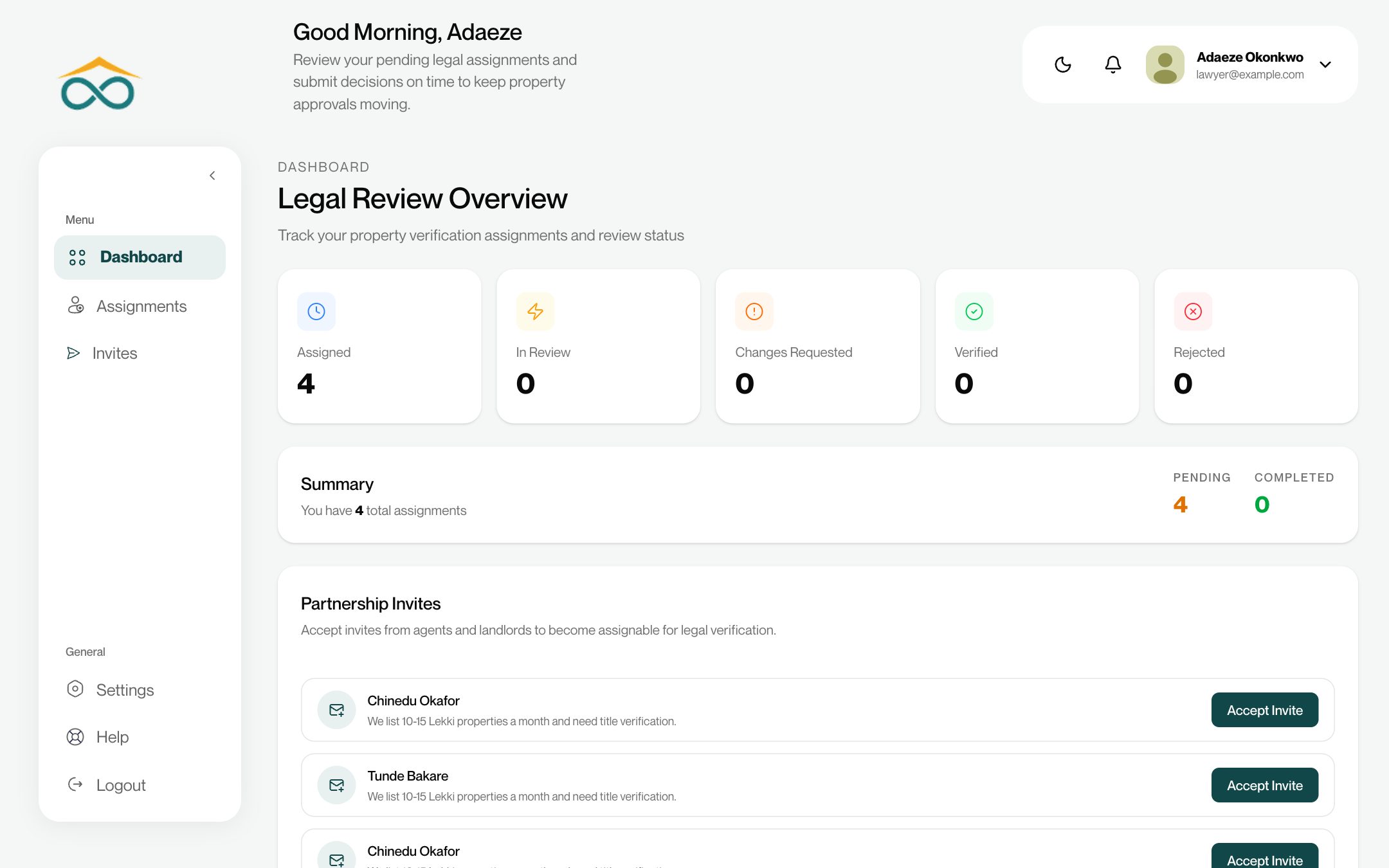
On first visit a short guided tour runs. It points at the bell ("Stay in the loop"), Dashboard ("Your legal overview"), Assignments, Invites ("Partnerships") and the account menu. It can be replayed from the account menu.
Help is unreachable for lawyers
/help. That route sits under the agent layout, which redirects every lawyer back to /legal. A lawyer who clicks either link lands on their dashboard again.Route guards
Three checks run in the browser, in this order:
src/layouts/ProtectedRoute.tsxwraps every signed-in route. With no access token it redirects to/auth/signin. If the stored user's role is notAGENT,LANDLORDorLAWYER, it clears the token, refresh token and user, then redirects to/auth/signin.src/layouts/LawyerLayout.tsxwraps/legaland everything under it. If the stored role is notLAWYERit redirects to/.src/layouts/RootLayout.tsxwraps the agent and landlord routes. If the stored role isLAWYERit redirects to/legal.
So an agent who types /legal/assignments lands on the agent dashboard, and a lawyer who types /listings lands on the lawyer dashboard.
The browser check is not the security boundary
LAWYER role, and each invite or assignment must belong to the signed-in lawyer ("You do not have access to this invite").States and edge cases
| Situation | What happens |
|---|---|
| Not signed in | Redirect to /auth/signin |
Signed in as agent or landlord, opens a /legal URL | Redirect to / |
Signed in as lawyer, opens an agent URL such as /requests or /help | Redirect to /legal |
| Access token expired | API calls fail and screens show their empty or not-found states. The lawyer screens use RTK Query, which does not trigger the automatic sign-out |
| New lawyer with no invites or assignments | Dashboard shows zeros and "No pending invites at the moment." |
What happens next
Read the pages in order: Dashboard, Partnership invites, Assignments, Reviewing an assignment, Notifications and settings. The agent's side of the same workflow is in Legal partners and Legal verification.