 HomeLink Hub
Partnership invites
How a lawyer reviews, accepts or rejects a partnership invite from an agent or landlord, and views the inviter's profile.
Where it lives
| Route | View file | Access |
|---|---|---|
/legal/invites | src/views/lawyer/invites/lawyer-invites.tsx | lawyer |
/legal/invites/partner/:id | src/views/lawyer/invites/partner-profile.tsx | lawyer |
The :id in the profile route is the inviter's user id. Invites can also be accepted from the dashboard, see Dashboard.
Before you start
- Signed in with the
LAWYERrole. - An agent or landlord has invited the lawyer's account email. The invite email ("You've Been Invited to Partner on HomeLink Hub") links straight to
/legal/invites.
| Partnership status | Shown here as | Meaning |
|---|---|---|
invite_pending | Invite Pending badge | Waiting for the lawyer's answer |
contracted | not listed | Accepted. The partner can now assign listings |
rejected | not listed | Declined. The partner may send a new invite |
Flow
Review pending invites
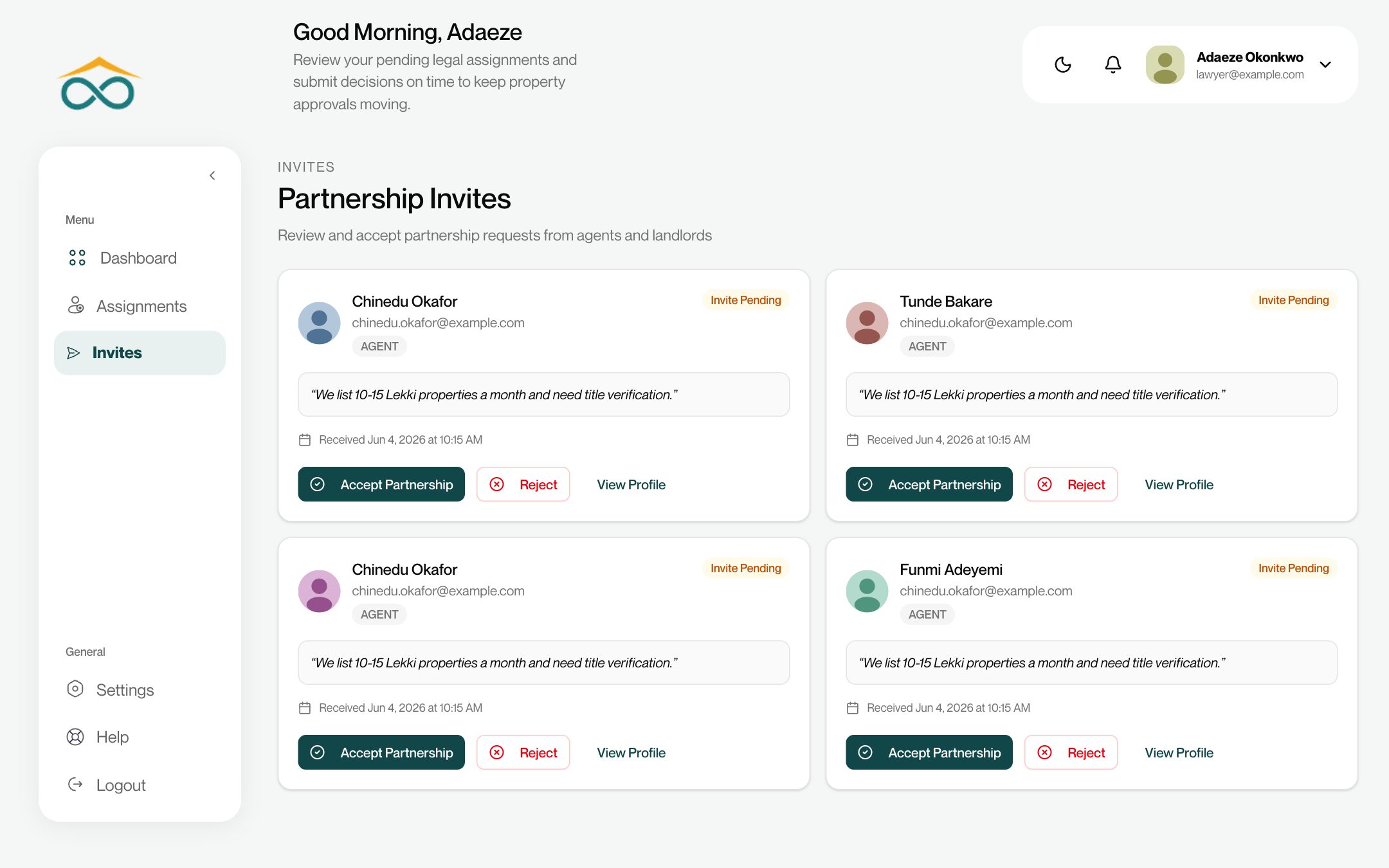
- Choose Invites in the sidebar. The page is headed "Partnership Invites" with "Review and accept partnership requests from agents and landlords".
- It loads
GET /api/v1/legal/partnership-invites, which returns only invites ininvite_pendingfor this lawyer. - Each invite is a card with:
- The inviter's avatar, name and email (the invited email is used if the inviter's details are missing).
- A role tag such as AGENT or LANDLORD.
- An Invite Pending badge.
- The invite note in quotes, when one was written.
- "Received (date) at (time)".
- Three buttons: Accept Partnership, Reject, View Profile.
Accept
- Press Accept Partnership. Both buttons on the card are disabled while it runs.
- The app sends
PATCH /api/v1/legal/partnership-invites/{inviteId}/accept. - A toast reads "You are now partnered with (first name)" (or "this agent" when the name is missing).
- The partnership moves from
invite_pendingtocontractedand the accepted date is stored. The list refetches and the card disappears. - On failure the toast shows the API message, or "Failed to accept invite".
Reject
- Press Reject. A confirmation dialog titled "Reject Partnership Invite?" explains "This will decline the invite from (first name). You can only proceed again if they send a new invite."
- Press Confirm Reject to continue, or Cancel to close the dialog. No reason is asked for.
- The app sends
PATCH /api/v1/legal/partnership-invites/{inviteId}/reject. - The dialog closes and a toast reads "Invite rejected". The partnership becomes
rejectedand the card disappears. - On failure the toast shows the API message, or "Failed to reject invite".
| Cause | API message |
|---|---|
| Invite id does not exist | "Invite not found" |
| Invite belongs to another lawyer | "You do not have access to this invite" |
| Accepting an invite that is no longer pending | "Invite has already been processed" |
| Rejecting an invite that is no longer pending | "Only pending invites can be rejected" |
View the inviter's profile
- Press View Profile on a card. The app opens
/legal/invites/partner/{inviterId}. - The page makes no new kind of request. It re-reads
GET /api/v1/legal/partnership-invitesand takes the inviter's details from the matching invite. - It shows the name, a role tag, the bio (or "No profile bio provided."), and four tiles: Email, Phone, Business, Location (state and country). Missing values read "Not provided".
- Back to Invites returns to
/legal/invites. There are no accept or reject buttons on the profile; go back to the card to respond.
The profile only exists while the invite is pending
Because the profile is read from the pending-invite list, it is no longer available once the invite has been accepted or rejected. Opening the same URL afterwards shows "Profile not found."
States and edge cases
| Situation | What the user sees |
|---|---|
| Loading | Centred spinner |
| No pending invites | A card reading "No pending invites" and "You'll see partnership invites from agents and landlords here" |
| Profile id not found among pending invites | "Profile not found." with a Back to Invites button |
| A new invite arrives while the page is open | Not shown until the page is reloaded |
No list of current partners
Once an invite is accepted it leaves this page, and the portal has no screen listing the agents and landlords a lawyer is contracted with. There is also no way for a lawyer to end a partnership from the app.
What happens next
- After accept: the API emails the inviter "Your Legal Partnership Invite Was Accepted". On their side the lawyer's card changes to Contracted and the lawyer becomes selectable in the Assign Lawyer dialog, see Legal verification.
- After reject: the invite drops off the inviter's partner list. They can invite the same email again.
- The next thing the lawyer sees from a partner is a new assignment, see Assignments.