 HomeLink Hub
Sign in and password reset
How an admin signs in, what happens to non-admin accounts, and the forgot and reset password screens.
Where it lives
| Route | View / component | Access |
|---|---|---|
/auth/signin | src/views/auth/Signin.tsx | Public |
/auth/forgot-password | src/views/auth/Forgot-password.tsx | Public |
/auth/reset-password?token=... | src/views/auth/Reset-password.tsx | Public (needs a token in the URL) |
/auth/signup | redirect in src/routes/auth.routes.tsx | Redirects to /auth/signin |
Shared pieces: src/layouts/AuthLayout.tsx (brand panel and guard), src/components/auth/auth-ui.tsx (card, fields, notices, password input), src/services/auth/auth-thunk.ts, src/services/auth/auth-slice.ts, src/config/roles.ts.
Before you start
- You need an
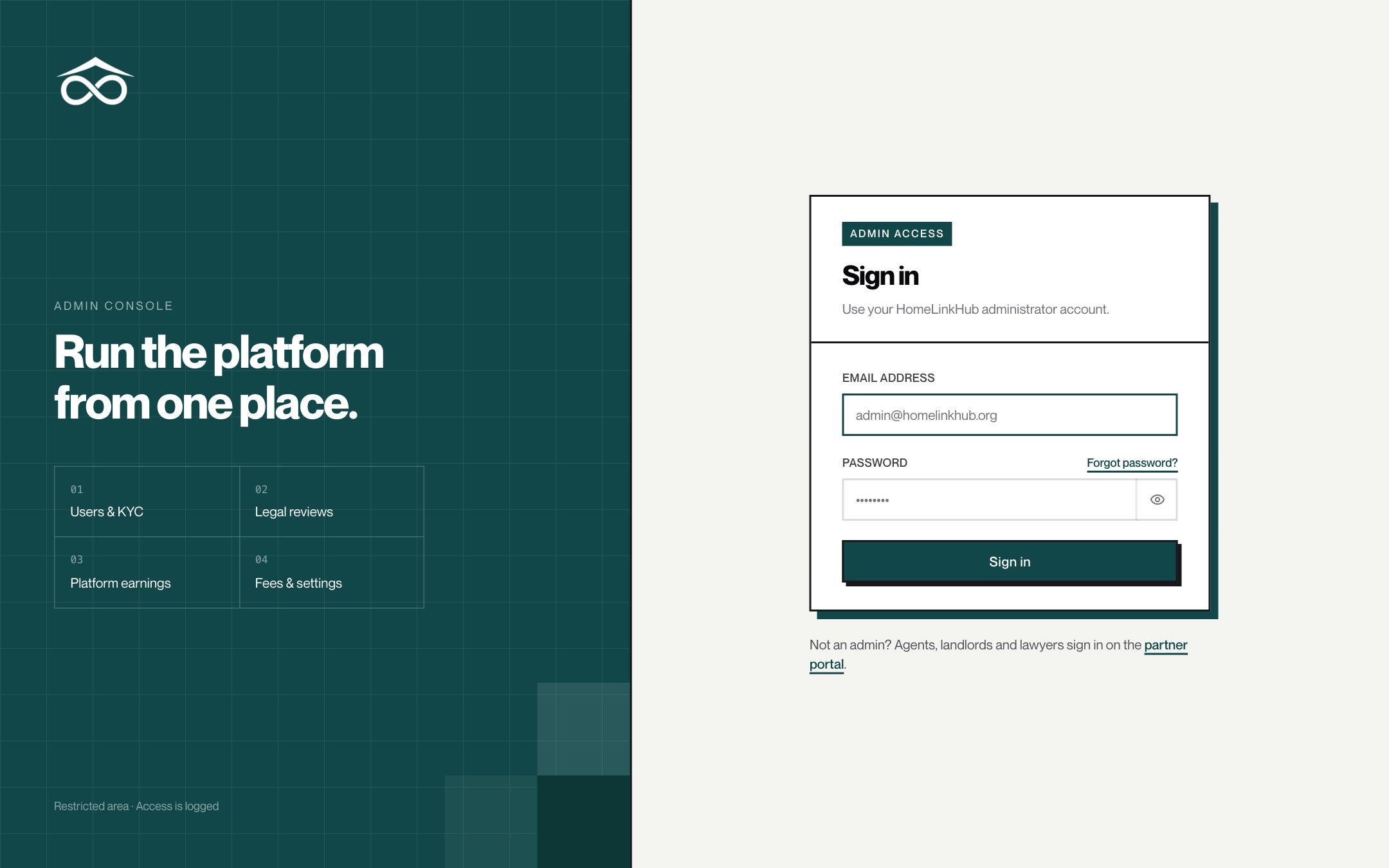
ADMINaccount that is active and has a verified email. See the overview for how admin accounts are created. - The auth screens always use the light design, whatever the dashboard theme is. On wide screens a brand panel ("Admin console", "Run the platform from one place.", "Restricted area · Access is logged") sits beside the form.
Flow
Sign in
- Open
/auth/signin. The card is headed "Admin access" / "Sign in" with the line "Use your HomeLinkHub administrator account."
- Fill in the form:
| Field | Rule |
|---|---|
| Email address | Required, browser type="email" check. Trimmed before sending. |
| Password | Required. Has a show/hide button; a "Caps Lock is on" warning appears while Caps Lock is active. |
- Click "Sign in" (the button reads "Signing in…" while waiting). The app sends
POST /api/v1/auth/signinwith the email and password. - If the response user has role
ADMIN:user,accessTokenandrefreshTokenare saved to the Reduxauthslice and tolocalStoragekeysuser,tokenandrefreshToken.- You are taken to the page you were originally trying to open if it starts with
/dashboard, otherwise to/dashboard.
- If the response user is not an admin:
- The local session is cleared immediately.
- The card changes to "Wrong portal" / "Taking you to your app" with "This dashboard is for HomeLinkHub administrators. Redirecting you to the right sign-in page…"
- The browser leaves for the client app sign-in (roles
AGENT,LAWYER,LANDLORD) or the consumer app sign-in (everyone else).
- If sign-in fails, the password field is cleared and the server's message is shown in a red notice. Messages the API returns here include "Invalid email or password.", "Please verify your email address before signing in." and "Your account has been deactivated. Please contact support." With no server message the notice reads "Sign in failed"; with no connection it reads "Can't reach the server. Check your connection."
Other elements on the card:
- "Forgot password?" beside the password label opens
/auth/forgot-passwordand carries over whatever email you typed. - The footer reads "Not an admin? Agents, landlords and lawyers sign in on the partner portal." and links to the client app sign-in.
A notice can appear above the form when you are sent here by another flow:
| Arriving from | Notice |
|---|---|
| An expired session | "Your session expired. Sign in again to continue." |
| A completed password reset | "Password updated. Sign in with your new password." |
Forgot password
- Open
/auth/forgot-password("Account recovery" / "Forgot password"). The email is pre-filled if you came from the sign-in card. - Enter the "Email address" (required, email format; it is trimmed and lower-cased) and click "Send reset link" ("Sending link…" while waiting).
- The app sends
POST /api/v1/auth/forgot-passwordwith the email. - On success the card changes to "Check your inbox" / "Reset link sent": "If
the emailbelongs to an admin account, a reset link is on its way. It expires in 1 hour." The API answers the same way whether or not the email exists. - From here you can:
- "Resend link": disabled for 30 seconds after each send and labelled "Resend in 30s" counting down. It fires the same request again.
- "Use a different email": returns to the form.
- "Back to sign in": returns to
/auth/signinwith the email carried over.
- On failure a red notice shows the server message or "Couldn't send the reset link. Try again."
Check where the emailed link points
In the service code read for this guide, POST /api/v1/auth/forgot-password builds the link from the client app URL for agents, landlords, lawyers and developers and from the consumer site URL for every other role, which includes ADMIN. The admin panel has its own /auth/reset-password page, but the emailed link for an admin account is not built from the admin URL. Confirm the behaviour in your environment before relying on it.
Reset password
- Open
/auth/reset-password?token=.... - Before showing the form the page checks the link:
- No
tokenin the URL: "Link problem" / "Invalid reset link", "This link is incomplete or has already been used. Request a new one to continue." - The token's own expiry time has passed: "Link problem" / "Link expired", "Reset links are valid for 1 hour. Request a new one to continue."
- Both show "Request a new link" (goes to
/auth/forgot-password) and "Back to sign in".
- No
- Otherwise the card is "Account recovery" / "Set a new password" with "Signing in again will be required on every device."
- Fill in the form:
| Field | Rule |
|---|---|
| New password | Required, at most 128 characters. Must meet all three listed rules: "At least 8 characters", "A letter", "A number". Each rule ticks and a three-part bar fills as it is met. |
| Confirm password | Required, at most 128 characters, must equal the new password. "Passwords don't match" shows under the field once you leave it with a different value. |
- Click "Update password" ("Updating…" while waiting). Client-side failures show a red notice: "Choose a password that meets every requirement below." or "The passwords don't match."
- The app sends
POST /api/v1/auth/reset-passwordwith the token and the new password. - On success any session in this browser is cleared and you land on
/auth/signinwith "Password updated. Sign in with your new password." - On failure the notice shows the server message (for example "Invalid or expired password reset token.") or "Couldn't reset your password. The link may have expired."
"Cancel and return to sign in" under the card leaves without changing anything.
States and edge cases
- Opening
/auth/signinor/auth/forgot-passwordwhile signed in as an admin redirects to/dashboard./auth/reset-passwordstays reachable. /auth/signupand/authboth redirect to/auth/signin.401responses from the auth endpoints never trigger the token refresh; they are shown as errors on the card.- When a non-admin signs in here, the local session is dropped without calling the sign-out endpoint, then the browser is redirected. They sign in again on their own app.
- The expiry check on the reset page only reads the token to fail early. The server still verifies the token when the form is submitted.
What happens next
- A successful reset clears the stored refresh token on the server, so every device has to sign in again.
- The server also creates a "Password Changed" notification for the account.
- A deactivated account cannot sign in; see activate and deactivate in Users.