 HomeLink Hub
Duplicate listings
The queue of new listings held because they resemble an existing one, the side-by-side review sheet, and the two resolve actions.
When a new listing sits close to an existing one and shares its address, rooms, price or photos, the platform raises a duplicate flag and holds the new listing off the site. An admin decides each flag here.
Where it lives
| Route | View / component | Access |
|---|---|---|
/dashboard/duplicates | src/views/duplicates/Duplicates.tsx | Admin only |
| (side sheet) | src/views/duplicates/DuplicateReviewSheet.tsx | Opened from a row |
Also: src/views/duplicates/duplicate-columns.tsx, src/views/duplicates/duplicate-format.ts (labels, confidence bands, comparison rows), src/services/duplicates/duplicates-thunk.ts, src/services/duplicates/duplicates-slice.ts (Redux slice duplicates). Server side: service/src/controllers/duplicate-flag.controller.ts and resolveFlag in service/src/services/duplicate-detection.service.ts.
Before you start
- Signed in as an admin.
- The count of open flags is also shown on the Dashboard as "Possible duplicates", which links here.
Flow
Work the queue
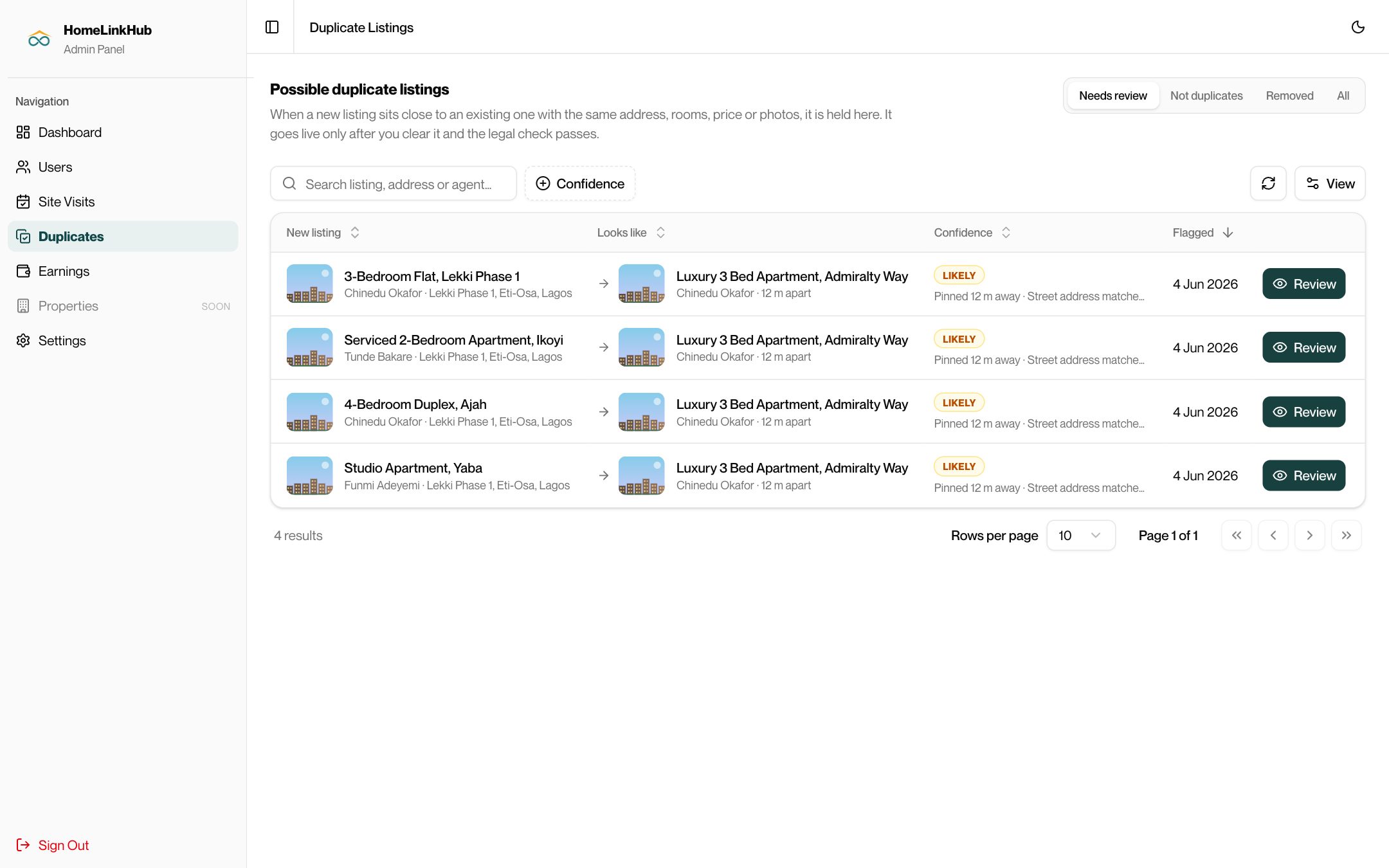
- Opening the page shows the heading "Possible duplicate listings" and four status tabs. The chosen tab is kept in the URL.
| Tab | URL | Request |
|---|---|---|
| Needs review (default) | no tab param | GET /api/v1/admin/duplicate-flags?limit=100&status=open |
| Not duplicates | ?tab=dismissed | GET /api/v1/admin/duplicate-flags?limit=100&status=dismissed |
| Removed | ?tab=confirmed | GET /api/v1/admin/duplicate-flags?limit=100&status=confirmed |
| All | ?tab=all | GET /api/v1/admin/duplicate-flags?limit=100 |
- The flags are stored in
duplicates.flags, and the active tab induplicates.filter. Switching tabs refetches and returns the table to page 1. - The table columns:
| Column | Shows | Notes |
|---|---|---|
| New listing | Cover image, title, who listed it and its area | The held listing |
| Looks like | The best match: cover image, title, who listed it, distance such as "40 m apart", and "+N more" when there are other matches | |
| Confidence | "Very likely", "Likely" or "Possible", with up to three reasons underneath | Sorts by the underlying score |
| Status | "Needs review", "Not a duplicate" or "Duplicate removed" | Hidden except on the "All" tab |
| Flagged | Date the flag was raised | Default sort, newest first |
| (action) | "Review" on open flags, "View" on decided ones |
- Confidence comes from the top match score:
| Label | Score |
|---|---|
| Very likely | 100 or more |
| Likely | 80 to 99 |
| Possible | below 80 (the server starts flagging at 60) |
- Toolbar: a search box "Search listing, address or agent…" (matches the titles, addresses, lister names and lister emails of the new listing and of every match), a "Confidence" filter, "Reset" when a search or filter is active, a refresh icon button, and "View" to toggle columns.
Review a flag
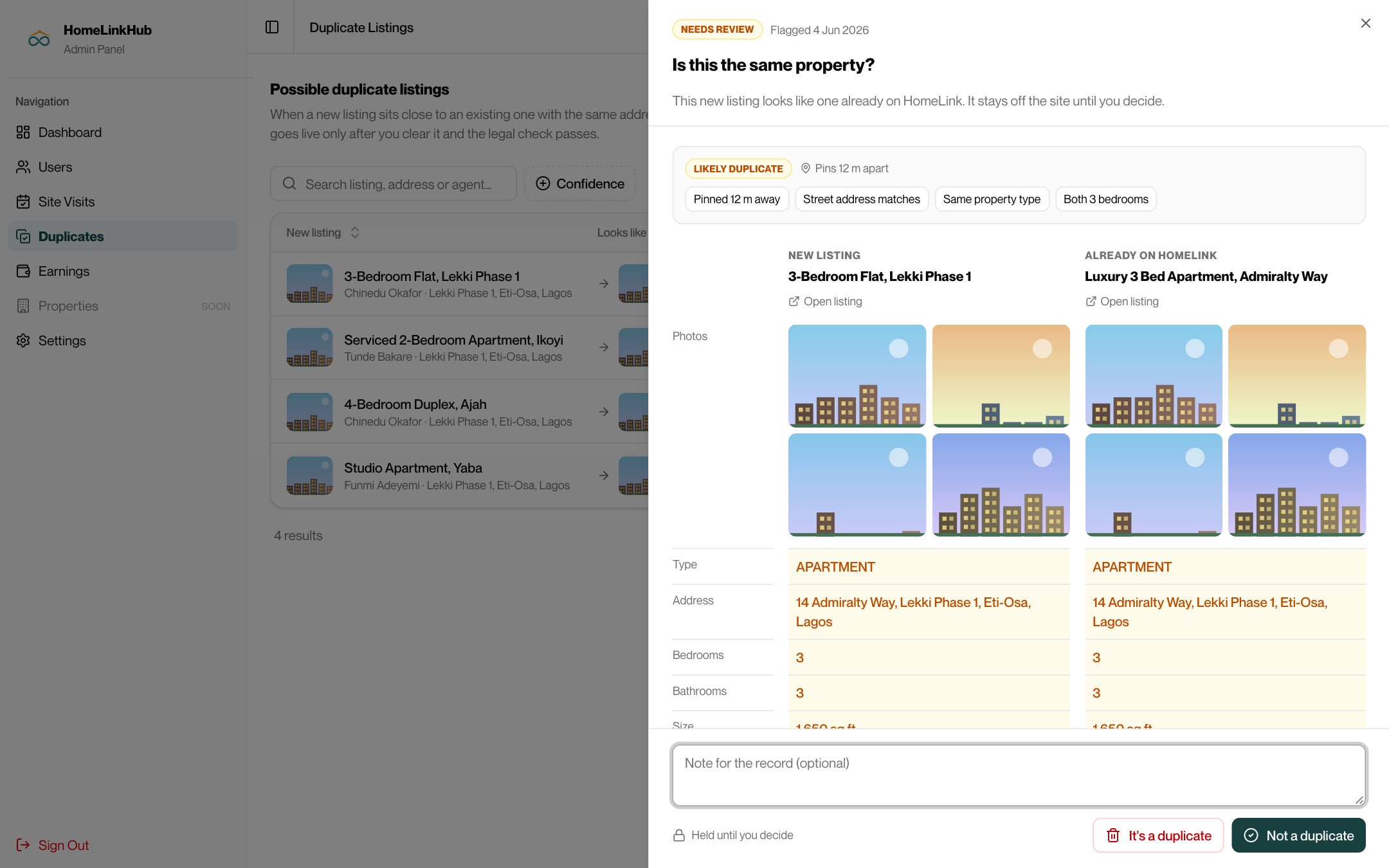
- Click a row or its "Review" button. The review sheet slides in, titled "Is this the same property?", with the status pill and "Flagged
date". No request is sent; the sheet uses the flag already loaded. - If the flag has more than one match, "Matches (N)" lists them as buttons with their confidence and distance. Click one to compare against it.
- The summary box shows "
confidenceduplicate", "Pinsdistanceapart" and every reason the match was raised. - The comparison grid puts "New listing" beside "Already on HomeLink". Each heading has an "Open listing" link to the consumer site (hidden for deleted listings). The rows are:
| Row | Compares |
|---|---|
| Photos | Up to four photos per side; click one to open it full size. "No photos" if there are none. |
| Type | Property type |
| Address | Street, community, LGA, state |
| Bedrooms, Bathrooms, Size | Room counts and size in sq ft |
| Price | Yearly rent, sale price or nightly price |
| Listed by | Agent, or landlord when there is no agent |
| Status | "Awaiting review", "Live", "Unlisted", "Rented", "Sold", "Draft", "Deleted" or "Removed" |
| Created | Date each listing was created |
Rows where both sides hold the same value are highlighted amber; the legend reads "Highlighted rows match exactly."
Decide: not a duplicate
- Optionally type in "Note for the record (optional)" (up to 1000 characters).
- Click "Not a duplicate".
- The app sends
POST /api/v1/admin/duplicate-flags/{id}/resolvewith body{ "decision": "not_duplicate", "notes": "..." }. Thenoteskey is left out when the note is blank. - On success the sheet closes. On the "Needs review" tab the flag leaves the list; on other tabs its status updates in place.
Decide: it's a duplicate
- Optionally add a note.
- Click "It's a duplicate". The buttons change to a confirmation step: "Cancel" and "Yes, unlist the new listing".
- Click "Yes, unlist the new listing". The app sends
POST /api/v1/admin/duplicate-flags/{id}/resolvewith body{ "decision": "duplicate", "notes": "..." }. - On success the sheet closes and the list updates as above.
While a decision is saving, the note box and buttons are disabled and the clicked button shows a spinner. duplicates.resolvingId holds the flag being saved.
Look back at a decision
- Open the "Not duplicates", "Removed" or "All" tab and click "View" on a row.
- The sheet description reads "Cleared as a different property." or "Removed as a duplicate.", and a box at the bottom shows "Decided by
nameondate" with any note. There are no action buttons; a decision cannot be changed from this screen.
States and edge cases
- Loading: skeleton rows on first load of a tab.
- List error: a red banner with the server message or "Failed to fetch duplicate listings", and a "Retry" button.
- Empty tabs: "No flagged listings" with, per tab, "Nothing to review. New listings that look like an existing one show up here.", "No flags have been cleared yet.", "No listings have been removed as duplicates yet." or "No listing has been flagged yet." When a search or filter hides everything: "Try a different search or clear the filters."
- Save error: shown in red above the buttons. If another admin got there first the server answers "This flag has already been resolved"; other messages include "Duplicate flag not found" and "notes must be text of at most 1000 characters". With no server message it reads "Could not save the decision". The sheet stays open.
- A listing that has since been removed shows as "Listing removed" in the table and sheet.
- A response for a tab you have already left is discarded, so a slow request cannot overwrite the tab you are on.
- This table has no row selection and no CSV export.
- Each tab loads at most 100 flags. The table's own paging works within those 100.
- In the "View" column menu the columns appear by their internal ids (
listing,match,confidence,status,createdAt) rather than their header labels. - The API also offers
GET /api/v1/admin/duplicate-flags/{id}, but this app does not call it.
What happens next
- "Not a duplicate" marks the flag
dismissedand releases the hold. If the listing is already legally verified and still awaiting verification, it goes live (listed) straight away. If the legal check has not passed yet, it stays off the site until it does. - "It's a duplicate" marks the flag
confirmed. The new listing is set tounlisted, its verified flag is cleared, and its verification note becomes "Removed as a duplicate of listingid". Drafts and deleted listings are left as they are. The existing listing it matched is not touched. - Either decision records who decided and when, and lowers the "Possible duplicates" count on the dashboard.