 HomeLink Hub
Earnings and payouts
Platform fee revenue, the payout bank account, manual withdrawals, automatic sweeping and the ledger of every outbound transfer.
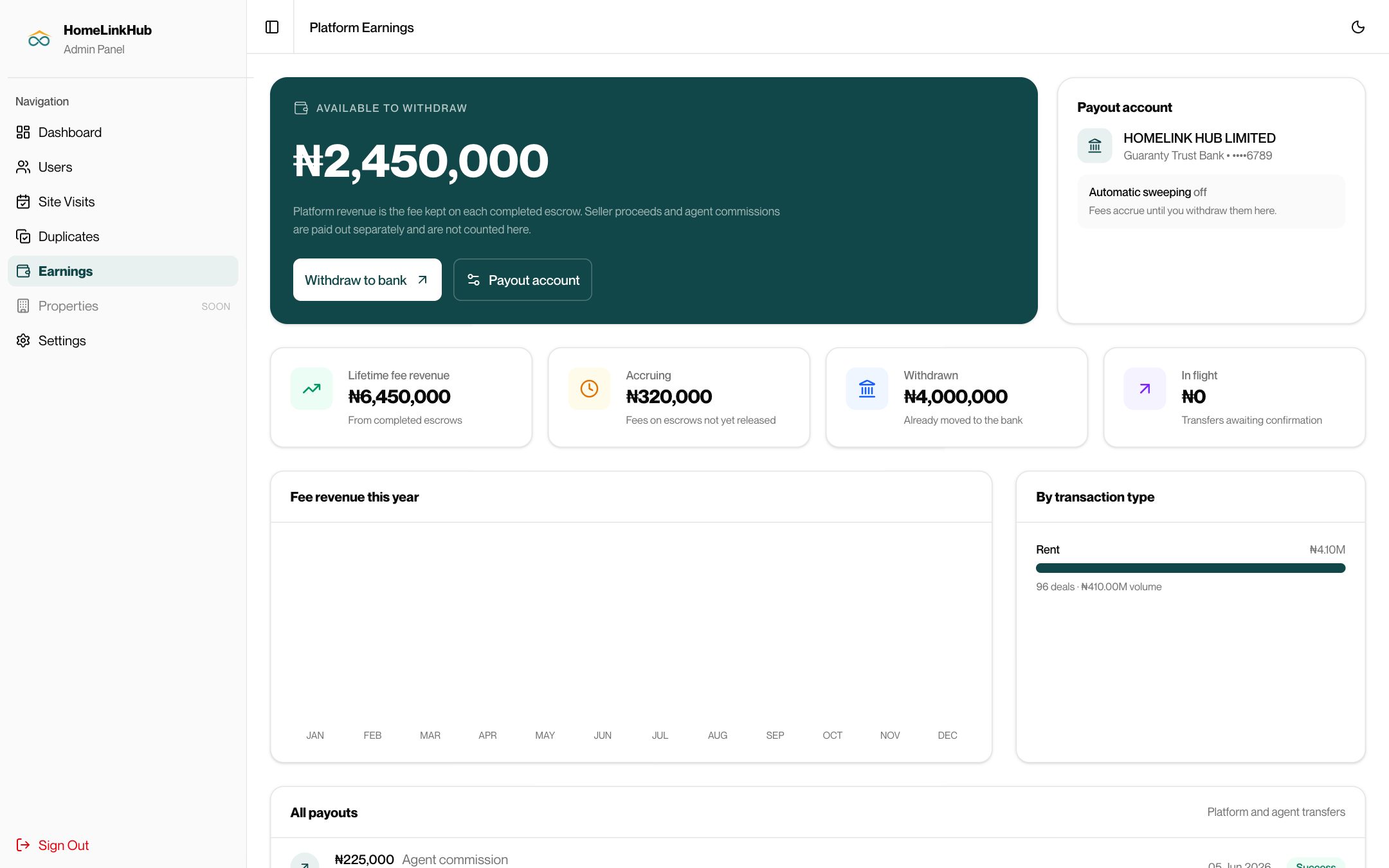
Platform revenue is the fee HomeLink Hub keeps on each completed escrow. Seller proceeds and agent commissions are paid out separately and are not counted in the balance on this page.
Where it lives
| Route | View / component | Access |
|---|---|---|
/dashboard/earnings | src/views/earnings/Earnings.tsx | Admin only |
| (dialog) | src/views/earnings/PayoutAccountDialog.tsx | "Payout account" or "Set payout account" |
| (dialog) | src/views/earnings/WithdrawDialog.tsx | "Withdraw to bank" |
Also: src/services/earnings/earnings-thunk.ts, src/services/earnings/earnings-slice.ts (Redux slice adminEarnings). Server side: service/src/controllers/admin-earnings.controller.ts.
Before you start
- Signed in as an admin.
- To withdraw you need a payout account saved and a balance above zero.
- To save a payout account you need the bank and its 10-digit account number.
Flow
Read the page
- Opening the page fires three requests:
| Request | Stored in |
|---|---|
GET /api/v1/admin/earnings | adminEarnings.earnings |
GET /api/v1/admin/payouts?page=1&limit=20 | adminEarnings.payouts, adminEarnings.payoutsTotal |
GET /api/v1/admin/payout-account | adminEarnings.payoutAccount |
- The green banner shows "Available to withdraw" with the balance, and two buttons: "Withdraw to bank" and "Payout account". "Withdraw to bank" is disabled while loading and when the balance is zero.
- The "Payout account" card beside it shows the account name, bank and masked number (only the last four digits are ever sent to the browser), then "Automatic sweeping on" with "Fees are transferred as each escrow completes." or "Automatic sweeping off" with "Fees accrue until you withdraw them here." With no account saved it reads "No account configured. Revenue accrues but cannot be paid out until one is set." with a "Set payout account" button.
- Four cards break the money down:
| Card | Meaning |
|---|---|
| Lifetime fee revenue | "From completed escrows" |
| Accruing | "Fees on escrows not yet released" |
| Withdrawn | "Already moved to the bank" |
| In flight | "Transfers awaiting confirmation" |
- "Fee revenue this year" is a bar per month. Hover a bar for the amount and "N deals".
- "By transaction type" lists each type with its fee total, "N deals" and "
amountvolume". - "All payouts" ("Platform and agent transfers") is the ledger. Each row shows the amount, a purpose, the beneficiary (or "HomeLinkHub" for platform transfers), bank name, transaction reference, date and status.
| Purpose label | Stored value |
|---|---|
| Agent commission | agent_commission |
| Platform fee sweep | platform_fee |
| Agent withdrawal | wallet_withdrawal |
| Platform withdrawal | platform_withdrawal |
Status is one of success, processing, pending or failed. A failed row also shows the failure reason in red.
The ledger shows the latest 20 transfers only
The page requests page 1 with a limit of 20 and has no paging controls, although the total is stored in adminEarnings.payoutsTotal. Older transfers are not reachable from this screen.
Set or change the payout account
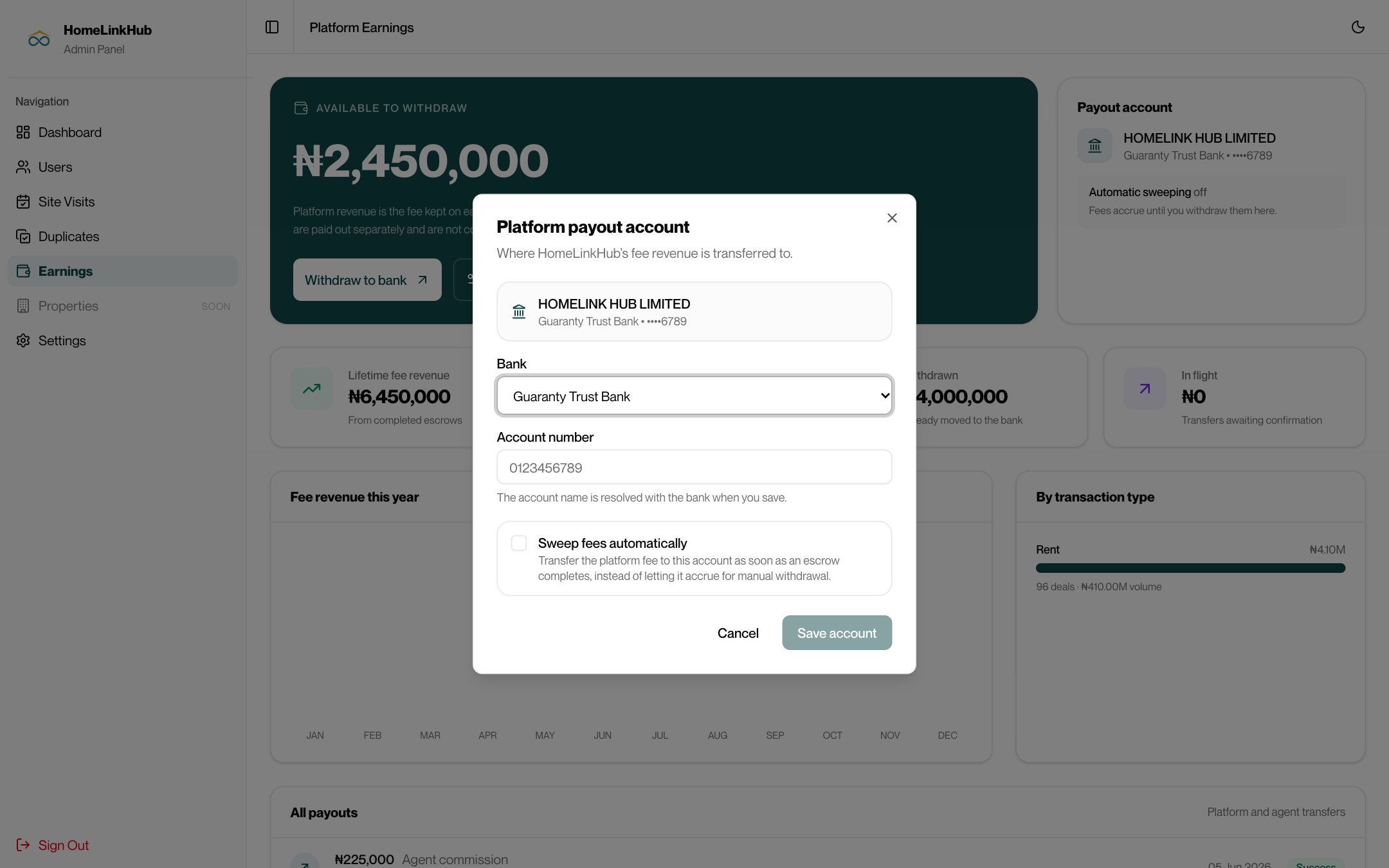
- Click "Payout account" in the banner, "Set payout account" on the card, or "Change" or "Set it up" inside the withdraw dialog. The dialog "Platform payout account" opens.
- The first time it opens, the bank list is loaded with
GET /api/v1/admin/banksand kept inadminEarnings.banks. Until it arrives the hint reads "Loading the bank list from the payout provider…". - If an account is already saved, it is shown at the top (name, bank, masked number).
- Fill in the form:
| Field | Rule |
|---|---|
| Bank | Required. Pick from the list; starts on "Select a bank", or on the saved bank. |
| Account number | Required, exactly 10 digits. Non-digits are stripped as you type. Always starts empty, even when an account is saved. |
| Sweep fees automatically | Checkbox. Starts at the saved value. "Transfer the platform fee to this account as soon as an escrow completes, instead of letting it accrue for manual withdrawal." |
- "Save account" is enabled only with a bank chosen and 10 digits entered. Click it ("Saving…" while waiting).
- The app sends
PUT /api/v1/admin/payout-accountwithaccountNumber,bankCode,bankNameandautoSweepPlatformFees. - On success the saved account is written to
adminEarnings.payoutAccount, the earnings are refetched withGET /api/v1/admin/earnings, and the dialog closes. The card now shows the new account. - On failure the server message (or "Failed to update payout account") appears in red inside the dialog, which stays open.
Check the account name after saving
The dialog says "The account name is resolved with the bank when you save." The server does ask the payout provider for the name, but if that lookup fails the account is still saved without a name. After saving, confirm that the card shows the expected account holder before withdrawing.
To switch automatic sweeping on or off without changing the account, you still have to re-enter the full account number, because the form never pre-fills it.
Withdraw to the bank
- Click "Withdraw to bank". The dialog "Withdraw platform revenue" opens with "
amountavailable." - The destination account is shown with a "Change" link, which closes this dialog and opens the payout account dialog. With no account saved, a red box reads "No payout account set" / "Configure the platform bank account before withdrawing." with a "Set it up" link.
- Enter the "Amount". Only digits and a decimal point are accepted. "Withdraw all" fills in the full available balance.
| Check | Message |
|---|---|
| Not a number, or not greater than zero | "Enter a valid amount" |
| Greater than the available balance | "Amount exceeds the available balance" |
- "Withdraw" is enabled only when an account exists and the amount passes both checks. Click it ("Sending…" while waiting). There is no second confirmation.
- The app sends
POST /api/v1/admin/withdrawwith body{ "amount": 50000 }. The server rounds the amount to a whole number and always pays the saved platform account. - On success:
- The new payout is added to the top of "All payouts".
- "Available to withdraw" drops by the amount and "In flight" rises by it straight away.
GET /api/v1/admin/earningsandGET /api/v1/admin/payouts?page=1&limit=20are refetched to confirm the figures.- The dialog closes.
- On failure the server message appears in red inside the dialog. Messages include "Withdrawal amount must be greater than zero", "Insufficient platform balance. Available: N", "No platform payout account configured. Set one under payout settings first.", the provider's failure reason, or "Withdrawal failed".
States and edge cases
- Loading: skeletons in the banner, cards, chart and ledger while their requests run.
- Page error: any failed request in this feature, including a failed save or withdrawal, also shows its message in a red-bordered box at the top of the page. It clears when the next earnings fetch, save or withdrawal starts.
- Empty chart: "No completed deals yet" / "Fee revenue appears once escrows start completing."
- Empty type list: "No completed transactions yet."
- Empty ledger: "No payouts have been made yet."
- If the bank list request fails, the dialog keeps showing the loading hint and offers no banks. Close and reopen it to try again.
- Both dialogs reset each time they open, so a previous attempt's amount or error never carries over.
- Amounts are shown in naira with no decimals; charts and the type list use short forms such as ₦1.25M.
What happens next
- A withdrawal creates a payout with purpose
platform_withdrawal. It sits in "In flight" while the transfer isprocessingand moves to "Withdrawn" once it succeeds. - With "Sweep fees automatically" on, the platform fee is transferred to the saved account as each escrow completes (ledger purpose "Platform fee sweep"). With it off, fees accrue until withdrawn here.
- Per the service code, when no payout account is configured, platform-fee payouts are recorded as
pendinginstead of being sent, so no revenue is lost while the account is missing. - The same available balance drives the banner on the Dashboard.
- The size of the fee itself is set in Platform settings.